
If you’re looking to protect your website from hackers, malware, and other online threats, the Sucuri WordPress Security Plugin is one of the most trusted solutions available. Designed specifically for WordPress sites, this plugin offers malware scanning, firewall protection, real-time monitoring, and expert support to keep your website safe and secure. In this guide, we’ll explore everything you need to know about the Sucuri WordPress Security Plugin, including its features, pricing, performance, and whether it’s the right choice for your site.
Table of Contents
What is Sucuri WordPress Security Plugin?
The Sucuri WordPress Security Plugin is a comprehensive security solution designed to protect WordPress websites from hackers, malware, and other cyber threats. It acts as a safeguard for your website by offering features like malware scanning, firewall protection, security monitoring, and incident response, ensuring your site stays secure and performs optimally.
Sucuri is known for its proactive approach to website security. Unlike basic plugins that only alert you after a breach, the Sucuri WordPress Security Plugin actively monitors your site for vulnerabilities and prevents attacks before they cause damage. This makes it a preferred choice for both small business websites and large-scale WordPress projects.
Key features of the plugin include:
- Malware Scanning: Detects malicious code or infected files on your website.
- Firewall Protection: Shields your site from hackers, DDoS attacks, and brute-force login attempts.
- Security Alerts: Sends real-time notifications for suspicious activities.
- Performance Optimization: Through CDN integration, Sucuri can also improve your website loading speed while keeping it secure.
In short, the Sucuri WordPress Security Plugin is more than just a security plugin—it’s a complete website protection solution that helps maintain your site’s integrity, reputation, and performance.

Installation & Setup of Sucuri WordPress Security Plugin
Installing and setting up the Sucuri WordPress Security Plugin is a straightforward process, even for beginners. The plugin integrates seamlessly with WordPress, allowing you to secure your website in just a few steps.
Step 1: Install the Plugin
- Log in to your WordPress dashboard.
- Go to Plugins > Add New.
- In the search bar, type “Sucuri WordPress Security Plugin”.
- Click Install Now, then Activate.
Step 2: Configure Basic Settings
Once activated, navigate to the Sucuri Security menu in your dashboard. The plugin provides a simple setup wizard to guide you through the initial configuration. Key settings to configure include:
- Security Notifications: Enable email alerts for security issues.
- File Integrity Monitoring: Check for changes in core WordPress files.
- Security Hardening: Apply recommended security measures to strengthen your site.
Step 3: Connect to Sucuri Cloud (Optional)
For enhanced protection, you can connect your website to Sucuri’s cloud-based firewall and CDN. This step is optional but recommended for websites with high traffic or those handling sensitive information.
Step 4: Run Initial Scan
After setup, run a full website scan to detect any existing vulnerabilities or malware. The Sucuri WordPress Security Plugin will generate a report highlighting potential risks and provide suggestions for remediation.
With these steps, your WordPress website is fully protected against common security threats, and you’ll receive ongoing monitoring to maintain its safety.
Malware Scanning & Removal with Sucuri WordPress Security Plugin
One of the core features of the Sucuri WordPress Security Plugin is its powerful malware scanning and removal capabilities. Malware can compromise your website’s performance, steal sensitive data, and even get your site blacklisted by search engines. Sucuri helps prevent these issues by detecting and removing malicious threats effectively.
How Malware Scanning Works
The Sucuri WordPress Security Plugin continuously monitors your website for suspicious activity and potential malware. It scans:
- Core WordPress files for unauthorized changes
- Themes and plugins for vulnerabilities
- Database for malware injections or malicious code
The plugin provides detailed scan reports that highlight infected files and potential security risks, making it easier for site owners to take corrective action.
Removing Malware
If malware is detected, Sucuri offers options to clean your website safely. You can:
- Automatically remove infected files using the plugin
- Manually delete or replace compromised files
- Restore clean backups if necessary
With Sucuri WordPress Security Plugin, you not only detect malware quickly but also ensure it is removed before it can harm your site or visitors. This proactive approach is essential for maintaining website security and protecting your online reputation.
Pricing & Plans for Sucuri WordPress Security Plugin
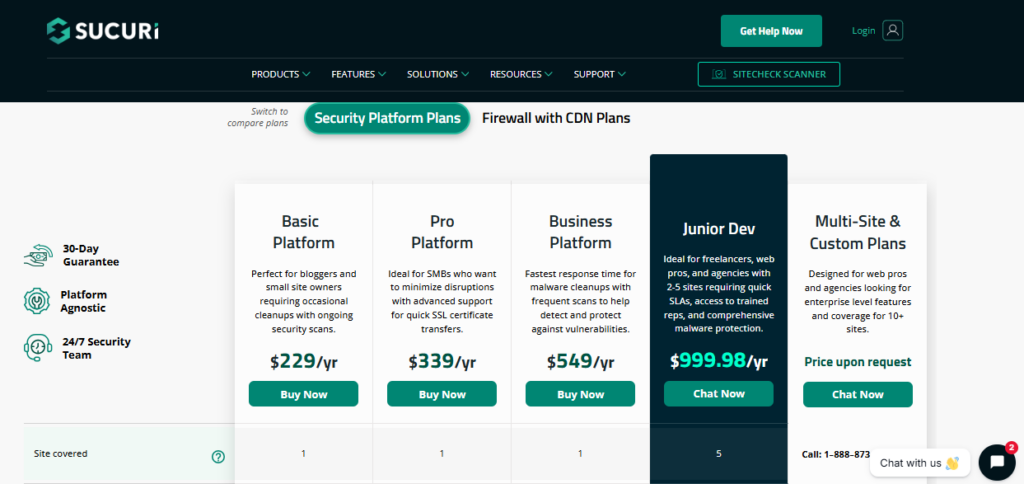
Understanding the pricing and plans for the Sucuri WordPress Security Plugin is essential before choosing a plan that fits your website’s needs. Sucuri offers a tiered pricing structure that scales based on the level of protection, frequency of scans, and response times — making it suitable for everything from small blogs to large business sites.
🛡️ Free Version (Basic Plugin)
- Cost: $0 (free)
- What it includes:
- Basic malware scanning
- Security hardening tips
- Activity auditing and alerts
- Who it’s for: Site owners who want simple monitoring and alerting without advanced protection.
Note: The free plugin does not include the advanced firewall (WAF) or premium malware removal services.
📦 Basic Plan
- Cost: Approximately $199.99 per year
- Features:
- Website firewall (WAF)
- Malware scanning every ~12 hours
- Malware removal if your site is compromised
- DDoS protection and brute-force mitigation
- CDN performance boost
- Standard support
- Best for: Small business websites, personal blogs, and sites that need reliable security at a moderate price.
🚀 Pro Plan
- Cost: Around $299.99 per year
- Features:
- Everything in Basic
- More frequent malware scanning (every ~6 hours)
- Enhanced firewall rules and SSL support
- Faster response times on malware cleanup
- Best for: Medium-sized sites and online stores that require closer monitoring and stronger protection.
🏢 Business Plan
- Cost: Around $499.99 per year
- Features:
- All Pro features
- Extremely frequent scans (every ~30 minutes)
- Priority malware removal (faster SLAs)
- Advanced DDoS protection and broader performance features
- Best for: High-traffic websites, eCommerce platforms, and business-critical sites handling sensitive user data.
Summary: The Sucuri WordPress Security Plugin pricing is structured around how proactive and fast the service responds to threats — not just the tools offered. Higher tiers deliver quicker scanning and cleanup with more advanced protections, while the Basic tier provides solid foundational security for most websites.
Firewall & Website Protection with Sucuri WordPress Security Plugin
A website firewall is one of the most important features of the Sucuri WordPress Security Plugin. It acts as a shield between your website and potential threats, blocking malicious traffic before it reaches your site. This proactive approach helps prevent hacks, DDoS attacks, and other common security risks.
How the Firewall Works
The Sucuri WordPress Security Plugin includes a cloud-based Web Application Firewall (WAF) that filters all incoming traffic. It detects and blocks threats such as:
- SQL injections
- Cross-site scripting (XSS) attacks
- Brute-force login attempts
- DDoS attacks and bot traffic
By filtering traffic at the server level, Sucuri reduces the risk of malicious requests reaching your WordPress site, keeping your data and users safe.
Additional Website Protection Features
Beyond the firewall, the plugin offers several other security layers:
- Real-time Threat Detection: Constantly monitors for suspicious activity.
- IP Blacklisting: Blocks known attackers or suspicious IP addresses.
- Security Hardening: Implements WordPress best practices to reduce vulnerabilities.
- SSL Support & CDN Integration: Ensures secure data transmission and improves website performance.
With these features, the Sucuri WordPress Security Plugin not only protects your website from attacks but also maintains its performance and uptime, giving you peace of mind.
Performance Impact of Sucuri WordPress Security Plugin
When choosing a security plugin, many website owners worry about its impact on site speed. The Sucuri WordPress Security Plugin is designed to protect your site without significantly affecting performance. In fact, some features, like the cloud-based firewall and CDN, can even improve website speed.
How Sucuri Affects Performance
- Cloud-Based Firewall: By filtering malicious traffic before it reaches your server, the plugin reduces the load on your hosting resources.
- Content Delivery Network (CDN) Integration: Sucuri’s CDN caches static content and delivers it from servers closer to your visitors, improving page load times.
- Lightweight Plugin Design: The plugin itself is optimized for minimal resource usage, so it won’t slow down your WordPress site.
Balancing Security and Speed
While enabling advanced firewall rules and frequent scans may slightly increase server load, the overall performance impact is minimal for most websites. In many cases, the Sucuri WordPress Security Plugin can even enhance user experience by blocking malicious bots that could otherwise slow down your site.
Overall, Sucuri provides robust security without compromising website speed, making it a reliable choice for both small blogs and high-traffic websites.
Security Monitoring & Alerts with Sucuri WordPress Security Plugin
Ongoing monitoring is a critical component of website security, and the Sucuri WordPress Security Plugin excels in this area. It continuously monitors your site for suspicious activity and sends timely alerts so you can address potential threats before they cause damage.
Real-Time Monitoring
The Sucuri WordPress Security Plugin scans your website regularly to detect:
- Malware injections
- File changes or unauthorized modifications
- Suspicious login attempts
- Website defacements or hacks
This constant monitoring ensures that any security issues are identified immediately, reducing the risk of prolonged attacks or compromised data.
Alerts and Notifications
Sucuri provides real-time alerts through email, allowing you to stay informed of security incidents as they happen. Key features include:
- Detailed reports of detected threats
- Notifications for changes to core WordPress files, themes, or plugins
- Actionable suggestions for resolving security issues quickly
By combining proactive monitoring with instant alerts, the Sucuri WordPress Security Plugin empowers website owners to respond promptly and prevent further damage. This feature is particularly valuable for high-traffic sites and eCommerce stores where downtime or hacks can lead to revenue loss.
Backup & Recovery with Sucuri WordPress Security Plugin
A strong security strategy isn’t complete without a reliable backup and recovery solution. The Sucuri WordPress Security Plugin helps protect your website by enabling quick recovery if your site is hacked, corrupted, or accidentally broken.
Backup Features
While Sucuri primarily focuses on security, it integrates seamlessly with WordPress backup tools and provides guidance on creating safe backups of your website. Key aspects include:
- Scheduled Backups: Ensure your site’s files and database are regularly backed up.
- Safe Storage: Backups can be stored offsite for added security.
- Integration with Third-Party Backup Tools: Sucuri works well alongside popular WordPress backup plugins for a comprehensive solution.
Recovery Capabilities
If your website is compromised, the Sucuri WordPress Security Plugin offers:
- Malware Cleanup: Removes infected files and restores your website to a clean state.
- Restoration from Backup: Allows you to roll back to a previous, secure version of your site quickly.
- Incident Support: Premium plans provide expert help for recovering hacked websites.
By combining malware removal with reliable recovery options, the Sucuri WordPress Security Plugin ensures your website can bounce back quickly from any security incident, minimizing downtime and protecting your reputation.
Reporting & Analytics with Sucuri WordPress Security Plugin
The Sucuri WordPress Security Plugin doesn’t just protect your website—it also provides detailed reporting and analytics that help you understand your site’s security status and take informed actions. These insights are crucial for maintaining a secure and well-monitored WordPress site.
Key Reporting Features
- Security Scan Reports: After each malware scan, Sucuri generates a detailed report highlighting infected files, suspicious activity, and vulnerabilities.
- Incident Logs: Tracks all detected security incidents, including blocked attacks, file changes, and login attempts.
- Website Activity Monitoring: Provides a summary of changes in themes, plugins, and core files, making it easier to spot unauthorized modifications.
- Firewall Analytics: Reports on traffic blocked by the firewall, including malicious IPs, bot traffic, and DDoS attempts.
Benefits of Analytics
By reviewing Sucuri’s reports, website owners can:
- Identify patterns in attacks and vulnerabilities
- Prioritize fixes and security hardening measures
- Track improvements in website security over time
- Provide clients or stakeholders with clear insights on website safety
The Sucuri WordPress Security Plugin makes it simple to turn raw security data into actionable insights, giving you confidence that your site is being monitored effectively.
Customer Support for Sucuri WordPress Security Plugin
A reliable security plugin is only as good as the support behind it, and the Sucuri WordPress Security Plugin offers a range of customer support options to ensure that website owners can resolve issues quickly and effectively.
Support Channels
- Ticket-Based Support: Premium plan users can submit support tickets directly through Sucuri’s dashboard for personalized assistance.
- Email Support: Quick responses for general questions or guidance on plugin features.
- Knowledge Base & Documentation: Extensive resources, tutorials, and FAQs to help users troubleshoot common issues independently.
Response Times and Expertise
The Sucuri WordPress Security Plugin team is known for fast response times, especially for higher-tier plans. Users can expect:
- Prompt assistance for malware cleanup and website hacks
- Guidance for firewall configuration and security hardening
- Expert advice on best practices for WordPress security
Why Customer Support Matters
Security incidents can be time-sensitive, and having access to expert support ensures that any issues are resolved quickly, minimizing downtime and protecting your website’s reputation. With Sucuri, you’re not just installing a plugin—you’re gaining a team of security experts ready to assist when needed.

Pros & Cons of Sucuri WordPress Security Plugin
When choosing a WordPress security solution, it’s important to weigh the benefits and limitations. The Sucuri WordPress Security Plugin offers robust protection, but like any tool, it has pros and cons that website owners should consider.
✅ Pros
- Comprehensive Protection: Combines malware scanning, firewall, and monitoring in one plugin.
- Effective Malware Removal: Quickly detects and removes threats before they damage your site.
- Minimal Performance Impact: Cloud-based firewall and CDN can even improve website speed.
- Real-Time Alerts: Keeps you informed of security issues immediately.
- Detailed Reporting & Analytics: Provides insights to track security trends and vulnerabilities.
- Reliable Customer Support: Expert assistance for malware cleanup, configuration, and security guidance.
❌ Cons
- Premium Plans Required for Full Protection: The free version lacks firewall and advanced malware removal.
- Cost Can Be High for Small Sites: Business-tier plans may be expensive for personal blogs.
- Backup Capabilities Are Limited: While it supports recovery, dedicated backup plugins are still needed for complete data safety.
- Setup May Be Overwhelming for Beginners: Advanced firewall and monitoring features require some understanding of WordPress security.
Overall, the Sucuri WordPress Security Plugin is a strong choice for WordPress site owners who want professional-grade protection, detailed monitoring, and peace of mind. While the cost and setup may be a consideration, the plugin’s features and support justify the investment for serious website owners.
If you’re curious how Sucuri compares to other WordPress security solutions, see our detailed analysis of Solid Security vs Wordfence for a side-by-side feature comparison.
Final Verdict: Sucuri WordPress Security Plugin
The Sucuri WordPress Security Plugin is a comprehensive security solution that provides robust protection, real-time monitoring, and effective malware removal for WordPress websites. From small blogs to high-traffic business sites, it offers the tools and support necessary to keep your website secure against hackers, malware, and other cyber threats.
Sucuri’s combination of a cloud-based firewall, continuous malware scanning, detailed reporting, and expert customer support makes it one of the most reliable WordPress security plugins available today. While the free version provides basic protection, the premium plans deliver full-featured security, faster malware cleanup, and advanced firewall capabilities.
Who Should Use Sucuri:
- Small businesses or personal bloggers who want reliable website protection.
- E-commerce sites that require proactive security and minimal downtime.
- Website owners looking for a professional-grade solution with detailed analytics and expert support.
Summary:
The Sucuri WordPress Security Plugin is a solid investment for anyone serious about website security. Its ease of use, comprehensive feature set, and minimal performance impact make it an ideal choice for protecting your WordPress site from evolving online threats. If website safety is a priority, Sucuri is a plugin that delivers both protection and peace of mind.
Frequently Asked Questions About Sucuri WordPress Security Plugin
1. What is the Sucuri WordPress Security Plugin?
The Sucuri WordPress Security Plugin is a comprehensive security tool that protects WordPress websites from malware, hackers, and other online threats. It includes features like malware scanning, firewall protection, security monitoring, and malware cleanup to keep your site safe.
2. How does the Sucuri WordPress Security Plugin protect my site?
Sucuri protects your WordPress website through a combination of a cloud-based firewall, real-time malware scanning, IP blacklisting, and security hardening. These features prevent attacks before they reach your website and alert you if any suspicious activity is detected.
3. Does the Sucuri WordPress Security Plugin slow down my website?
No, the Sucuri WordPress Security Plugin is designed to have minimal performance impact. Its cloud-based firewall filters traffic before it reaches your server, and CDN integration can even improve site speed by delivering content faster to visitors.
4. Can the Sucuri WordPress Security Plugin remove malware?
Yes, the plugin can detect and remove malware from your website. Premium plans also offer professional malware cleanup and restoration services, ensuring your WordPress site is fully cleaned and secure.
5. What are the pricing options for the Sucuri WordPress Security Plugin?
The plugin offers a free basic version with limited protection. Premium plans range from Basic, Pro, to Business, providing advanced firewall protection, frequent malware scanning, and faster response times for critical security incidents.
6. Does the Sucuri WordPress Security Plugin include backup and recovery?
While Sucuri primarily focuses on security, it supports website recovery after a hack or malware infection. For full backup solutions, it is recommended to use Sucuri alongside a dedicated WordPress backup plugin.
7. How good is the customer support for the Sucuri WordPress Security Plugin?
Sucuri offers reliable support through tickets, email, and an extensive knowledge base. Premium users receive expert assistance for malware removal, firewall setup, and general security guidance.
8. Who should use the Sucuri WordPress Security Plugin?
The Sucuri WordPress Security Plugin is ideal for bloggers, small businesses, e-commerce sites, and any WordPress site that wants professional-grade security with minimal performance impact.