
Solid Security Pro vs Wordfence – which WordPress security plugin is the right choice for your website? Choosing the right security solution is crucial to protect your site from hackers, malware, and other online threats. Both plugins offer powerful features, but they differ in ease of use, performance, pricing, and advanced tools.
In this detailed comparison, we’ll break down Solid Security Pro vs Wordfence across key factors like core security features, performance impact, support, and ideal use cases. By the end, you’ll know which plugin is best suited for your WordPress site—whether you’re a beginner, a small business owner, or managing a high-traffic online store.
Table of Contents
Pricing & Plans: Solid Security Pro vs Wordfence
When comparing Solid Security Pro vs Wordfence, pricing is often one of the first factors website owners consider. Both plugins offer free versions with basic security features, but their premium plans differ in features, flexibility, and cost.
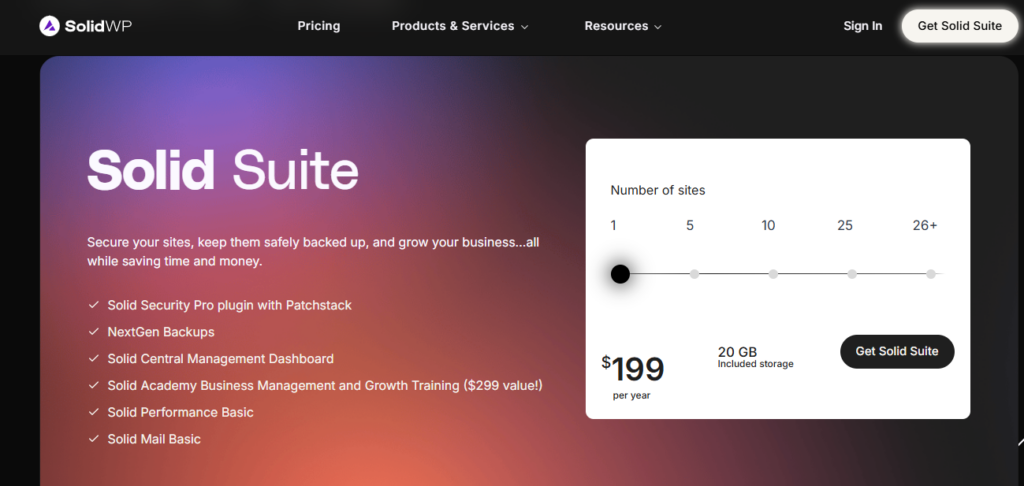
1. Solid Security Pro Pricing
- Free Version: Solid Security Pro offers a free plan that includes essential security features like firewall protection, malware scanning, and basic login security.
- Premium Plan: The paid version starts at $49 per year per website, unlocking advanced features such as real-time threat detection, activity monitoring, and more customization options for security rules.
- Value for Money: Solid Security Pro’s premium plan is known for being affordable while providing a comprehensive set of features for small to medium-sized websites.
2. Wordfence Pricing
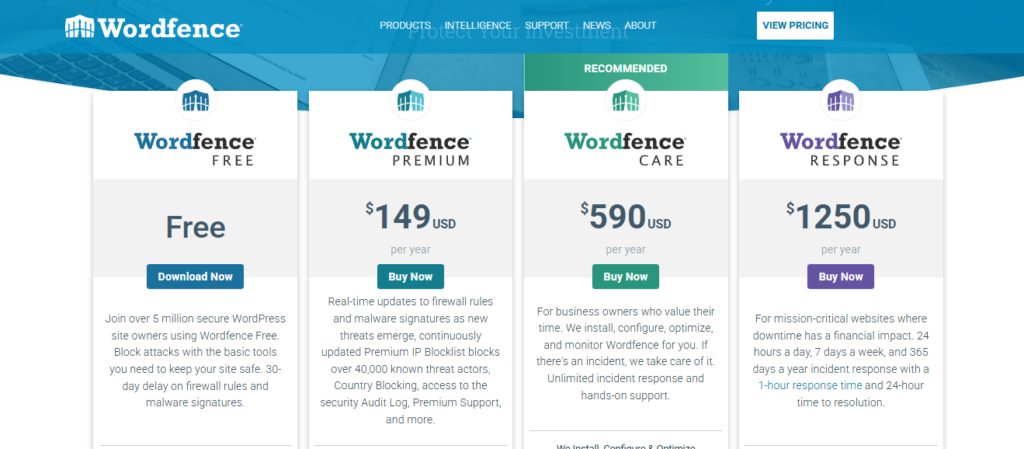
- Free Version: Wordfence’s free version includes malware scanning, basic firewall protection, and login security, which is suitable for personal blogs or small websites.
- Premium Plan: Wordfence Premium starts at $99 per year per site, offering real-time IP blocking, scheduled scans, country blocking, and premium support.
- Value for Money: While slightly more expensive than Solid Security Pro, Wordfence’s premium plan includes extensive threat intelligence and advanced security features that may appeal to larger sites or eCommerce platforms.
Comparison Summary:
| Feature | Solid Security Pro Free | Solid Security Pro Premium | Wordfence Free | Wordfence Premium |
|---|---|---|---|---|
| Firewall Protection | ✅ | ✅ | ✅ | ✅ |
| Malware Scanning | ✅ | ✅ | ✅ | ✅ |
| Real-Time Threat Detection | ❌ | ✅ | ❌ | ✅ |
| Activity Monitoring | ❌ | ✅ | ❌ | ✅ |
| Price/Year | Free | $49 | Free | $99 |
When deciding between Solid Security Pro vs Wordfence, your choice may depend on budget, site size, and the level of security features you need. Solid Security Pro offers a more affordable premium plan, while Wordfence provides advanced protection with slightly higher pricing.
Ease of Installation & Setup: Solid Security Pro vs Wordfence
When comparing Solid Security Pro vs Wordfence, ease of installation and setup plays a major role—especially for beginners who want strong security without complex configuration.
Solid Security Pro Installation & Setup
Solid Security Pro is designed with simplicity in mind. Installation follows the standard WordPress plugin process and takes only a few clicks. Once activated, the plugin guides users through a setup wizard that automatically configures recommended security settings based on your website type.
This guided approach makes Solid Security Pro ideal for beginners and non-technical users. Advanced users can still customize settings such as login protection, file change detection, and firewall rules if needed.
Wordfence Installation & Setup
Wordfence is also easy to install directly from the WordPress plugin repository. However, its setup process is more detailed. After activation, Wordfence asks users to configure multiple options, including scan frequency, firewall mode, and alert preferences.
While this level of control is great for experienced users, beginners may find the number of settings slightly overwhelming at first. That said, Wordfence provides clear explanations and documentation to help users understand each option.
Ease of Use Comparison
Overall, in the Solid Security Pro vs Wordfence comparison, Solid Security Pro offers a faster and more beginner-friendly setup experience, while Wordfence provides deeper customization at the cost of a steeper learning curve.
User Interface & Dashboard: Solid Security Pro vs Wordfence
A well-designed dashboard makes it easier to monitor threats and manage security settings efficiently. In the Solid Security Pro vs Wordfence comparison, both plugins offer powerful dashboards, but they differ in layout, simplicity, and usability.
Solid Security Pro User Interface
Solid Security Pro features a clean and modern dashboard that focuses on clarity. Key security information—such as login protection status, recent security events, and overall site health—is displayed in a simple, easy-to-read format.
The menu structure is intuitive, making it easy for users to find settings without digging through complex options. Visual indicators and status alerts help users quickly understand whether their site is secure or requires attention. This makes Solid Security Pro especially suitable for beginners and users who prefer a straightforward interface.
Wordfence User Interface
Wordfence offers a more detailed and data-rich dashboard. It provides real-time traffic monitoring, security alerts, firewall status, and scan results all in one place. While this level of detail is valuable for advanced users, the interface can feel overwhelming to beginners due to the amount of information displayed.
That said, Wordfence’s dashboard is highly functional and gives experienced users greater visibility and control over their website’s security activity.
UI Comparison Summary
In the Solid Security Pro vs Wordfence comparison, Solid Security Pro excels in simplicity and ease of navigation, while Wordfence stands out for advanced monitoring and in-depth security insights. Your choice depends on whether you value simplicity or detailed control.
Core Security Features: Solid Security Pro vs Wordfence
The most important part of any WordPress security plugin is how well it protects your website from real-world threats. In this Solid Security Pro vs Wordfence comparison, both plugins offer strong core security features, but they approach protection in different ways.
Firewall Protection
Solid Security Pro includes a powerful firewall that helps block suspicious traffic and common attack patterns before they reach your website. It focuses on preventing brute-force attacks and unauthorized access through smart rule-based protection.
Wordfence uses a well-known endpoint firewall that runs directly on your WordPress site. It identifies and blocks malicious traffic in real time using constantly updated threat intelligence. This makes Wordfence particularly effective against known vulnerabilities and emerging threats.
Malware Scanning & Detection
Solid Security Pro provides scheduled malware scans that monitor files for changes and suspicious behavior. It alerts users when unauthorized modifications are detected, allowing quick action to secure the site.
Wordfence excels in malware scanning with deep file inspections, signature-based detection, and real-time scan updates for premium users. It compares core WordPress files against official repositories to identify malware and compromised code accurately.
Login Security & Authentication
Login protection is a key factor in the Solid Security Pro vs Wordfence comparison. Solid Security Pro offers strong login security features, including two-factor authentication (2FA), brute-force protection, and password enforcement rules.
Wordfence also includes login security tools such as 2FA, CAPTCHA, login attempt limiting, and IP-based blocking. These features help prevent unauthorized access and credential-stuffing attacks.
Threat Monitoring & Alerts
Solid Security Pro focuses on proactive protection with clear alerts and activity logs that notify users of suspicious behavior. Its reporting is easy to understand and designed for quick decision-making.
Wordfence provides detailed real-time alerts, live traffic monitoring, and security notifications. Advanced users benefit from in-depth logs and immediate insight into ongoing attacks.
Core Features Comparison Summary
In the Solid Security Pro vs Wordfence matchup, Solid Security Pro emphasizes prevention and simplicity, while Wordfence delivers deep scanning, real-time intelligence, and advanced threat detection. Both plugins provide reliable core security, but Wordfence offers more granular control for power users.
Advanced Features & Tools: Solid Security Pro vs Wordfence
Beyond basic protection, advanced security features can make a big difference in how well your website stays protected over time. In the Solid Security Pro vs Wordfence comparison, both plugins offer powerful advanced tools, but they cater to different types of users.
Activity Logs & Monitoring
Solid Security Pro includes detailed activity logs that track user actions such as logins, file changes, and configuration updates. These logs help website owners quickly identify suspicious behavior and respond before it becomes a serious issue.
Wordfence also provides activity monitoring, but it goes a step further with live traffic monitoring, allowing users to see attacks and blocked requests in real time. This feature is especially useful for high-traffic or business-critical websites.
IP Blocking & Access Controls
Solid Security Pro allows manual IP blocking and advanced access rules to prevent unauthorized users from accessing specific areas of your site. These controls are easy to configure and suitable for users who want effective protection without complex rules.
Wordfence offers advanced IP blocking, including real-time IP blacklists and country-level blocking (premium feature). This gives Wordfence an edge for sites that need aggressive protection against global attack sources.
File Change Detection & Recovery
Solid Security Pro monitors core files and alerts users when unexpected changes occur. This helps detect hacks early and maintain file integrity.
Wordfence provides deeper file inspection and repair options, allowing users to restore modified core files directly from the WordPress repository. This makes cleanup faster after a security incident.
Automation & Custom Rules
In the Solid Security Pro vs Wordfence comparison, automation is another key difference. Solid Security Pro focuses on smart defaults and automated protection, reducing the need for manual configuration.
Wordfence gives advanced users full control through customizable firewall rules, scan schedules, and alert triggers. While powerful, these options require more technical knowledge.
Advanced Tools Comparison Summary
Overall, Solid Security Pro is ideal for users who want strong protection with minimal setup, while Wordfence excels in advanced monitoring, customization, and recovery tools. Choosing between them depends on how much control and visibility you want over your website’s security.
Performance & Website Impact: Solid Security Pro vs Wordfence
Website security should never come at the cost of speed or user experience. In the Solid Security Pro vs Wordfence comparison, performance impact is an important factor—especially for sites that rely on fast load times and smooth navigation.
Solid Security Pro Performance
Solid Security Pro is designed to run efficiently in the background without putting heavy load on your server. Its security features are optimized to minimize resource usage, making it a good choice for shared hosting environments and smaller websites.
Because many of its protections rely on smart rules and automated configurations, Solid Security Pro generally has a low impact on page load speed and overall website performance.
Wordfence Performance
Wordfence offers powerful real-time scanning and monitoring features, but these can be more resource-intensive. Its endpoint firewall and deep malware scans run directly on your server, which may lead to increased CPU and memory usage—particularly on high-traffic websites or lower-tier hosting plans.
That said, Wordfence allows users to adjust scan schedules and performance settings to reduce server load, making it manageable for experienced users who know how to optimize configurations.
Speed & Resource Usage Comparison
In the Solid Security Pro vs Wordfence debate, Solid Security Pro generally performs better on lightweight hosting setups, while Wordfence provides stronger real-time protection at the cost of higher resource consumption. The performance difference is most noticeable on shared hosting or budget servers.
Which One Is Better for Performance?
If performance and speed are your top priorities, Solid Security Pro may be the better option. If your website can handle higher resource usage and you want maximum real-time security visibility, Wordfence remains a strong choice.
While security is critical, website performance also plays a major role in user experience. If you want to learn more about improving WordPress speed alongside security, check out our detailed guide on LiteSpeed Cache vs WP Rocket.
Support & Documentation: Solid Security Pro vs Wordfence
Reliable support and clear documentation are essential when dealing with website security issues. In the Solid Security Pro vs Wordfence comparison, both plugins offer helpful resources, but the level of support varies depending on whether you’re using the free or premium version.
Solid Security Pro Support & Documentation
Solid Security Pro provides support primarily for premium users through a dedicated ticket-based system. This ensures that paying customers receive timely and personalized assistance when security issues arise.
The plugin also offers a well-structured knowledge base with step-by-step guides, FAQs, and best practices for securing WordPress websites. The documentation is beginner-friendly and focuses on helping users quickly understand and implement security features without confusion.
Wordfence Support & Documentation
Wordfence offers extensive documentation that covers almost every aspect of WordPress security, from basic setup to advanced configurations. Their knowledge base, blog, and security learning center are valuable resources for both beginners and advanced users.
Free users rely mainly on community forums for support, while Wordfence Premium users receive priority support and faster response times. This tiered support system makes Wordfence a good option for users who want access to deep technical guidance.
Support Comparison Summary
In the Solid Security Pro vs Wordfence comparison, Solid Security Pro focuses on straightforward documentation and responsive premium support, while Wordfence stands out with its extensive educational resources and advanced troubleshooting materials. Both plugins provide reliable support, but Wordfence offers more depth for experienced users.
Pros & Cons Summary: Solid Security Pro vs Wordfence
Summarizing the strengths and weaknesses of each plugin makes it easier to decide which solution fits your needs. In this Solid Security Pro vs Wordfence comparison, both plugins deliver strong security, but they excel in different areas.
Solid Security Pro – Pros
- Easy to install and beginner-friendly setup
- Clean, intuitive dashboard
- Low impact on website performance
- Affordable premium pricing
- Strong login security and proactive protection
Solid Security Pro – Cons
- Fewer advanced customization options compared to Wordfence
- Limited real-time threat intelligence
- Some advanced features are only available in the premium version
Wordfence – Pros
- Powerful endpoint firewall with real-time threat intelligence
- Deep malware scanning and file repair tools
- Live traffic monitoring and detailed security logs
- Advanced IP and country-level blocking (premium)
- Ideal for high-traffic and complex websites
Wordfence – Cons
- Higher resource usage, especially on shared hosting
- More complex interface for beginners
- Premium version is more expensive
Quick Comparison Takeaway
In the Solid Security Pro vs Wordfence debate, Solid Security Pro is best for users who want simple, lightweight, and effective protection, while Wordfence is better suited for advanced users who need deep security insights and maximum control.
Use Cases & Ideal Users: Solid Security Pro vs Wordfence
Choosing the right security plugin depends largely on the type of website you run and your technical experience. In this Solid Security Pro vs Wordfence comparison, each plugin is better suited for specific use cases.
Who Should Use Solid Security Pro?
Solid Security Pro is ideal for users who want strong WordPress security without complexity. It works best for:
- Beginners and non-technical website owners
- Small to medium-sized blogs and business websites
- Sites running on shared or budget hosting
- Users who prefer automated protection with minimal configuration
- Website owners looking for affordable premium security
Solid Security Pro focuses on prevention and ease of use, making it a great option for users who want peace of mind without constantly managing security settings.
Who Should Use Wordfence?
Wordfence is better suited for users who want advanced security control and real-time visibility. It is ideal for:
- Advanced users and developers
- High-traffic websites and membership sites
- WooCommerce and eCommerce stores
- Websites hosted on VPS or dedicated servers
- Users who want real-time attack monitoring and detailed security logs
In the Solid Security Pro vs Wordfence decision, Wordfence stands out for websites that require aggressive protection and deep security insights.
Quick Use Case Comparison
- Best for Beginners: Solid Security Pro
- Best for Advanced Security Needs: Wordfence
- Best for Performance-Focused Sites: Solid Security Pro
- Best for Real-Time Monitoring: Wordfence
Final Verdict: Solid Security Pro vs Wordfence
After comparing features, performance, ease of use, pricing, and support, it’s clear that both plugins offer reliable WordPress security—but they serve different types of users. In the Solid Security Pro vs Wordfence comparison, the best choice depends on your website’s needs and your technical experience.
Choose Solid Security Pro if:
- You want a beginner-friendly security solution
- You prefer automated protection with minimal setup
- Your website runs on shared or limited hosting
- You need strong security at an affordable price
Solid Security Pro delivers effective protection without overwhelming users. Its low performance impact and clean interface make it an excellent choice for small businesses, bloggers, and site owners who want simplicity and reliability.
Choose Wordfence if:
- You need advanced security features and real-time threat intelligence
- You want full visibility into attacks and traffic
- Your website can handle higher resource usage
- You manage a high-traffic or eCommerce website
Wordfence excels in deep malware scanning, real-time monitoring, and advanced customization. While it requires more technical knowledge, it offers unmatched insight and control for power users.
Overall Recommendation
In the Solid Security Pro vs Wordfence debate, Solid Security Pro wins for ease of use and performance efficiency, while Wordfence stands out for advanced protection and real-time security intelligence. There is no one-size-fits-all answer—choosing the right plugin depends on your priorities.
FAQs: Solid Security Pro vs Wordfence
Which WordPress security plugin is better: Solid Security Pro vs Wordfence?
When comparing Solid Security Pro vs Wordfence, neither plugin is objectively better for everyone. Solid Security Pro is ideal for beginners who want simple, automated protection with low performance impact, while Wordfence is better for advanced users who need real-time threat intelligence and deep security monitoring.
Is Solid Security Pro easier to use than Wordfence?
Yes, in the Solid Security Pro vs Wordfence comparison, Solid Security Pro is generally easier to use. It offers a guided setup and a cleaner dashboard, whereas Wordfence provides more advanced options that may feel overwhelming for beginners.
Which has better performance: Solid Security Pro vs Wordfence?
In terms of performance, Solid Security Pro vs Wordfence shows a clear difference. Solid Security Pro is lighter and better suited for shared hosting, while Wordfence can use more server resources due to its real-time scanning and endpoint firewall.
Does Wordfence provide stronger security than Solid Security Pro?
When comparing Solid Security Pro vs Wordfence, Wordfence offers stronger real-time threat detection, live traffic monitoring, and deeper malware scanning. However, Solid Security Pro still provides excellent preventive security for most WordPress websites.
Which is more affordable: Solid Security Pro vs Wordfence?
Pricing is an important factor in Solid Security Pro vs Wordfence. Solid Security Pro is more affordable, especially for premium features, while Wordfence Premium costs more but includes advanced threat intelligence and monitoring tools.
Is Solid Security Pro vs Wordfence better for WooCommerce websites?
For WooCommerce and high-traffic sites, Solid Security Pro vs Wordfence often favors Wordfence due to its advanced firewall, real-time alerts, and detailed logs. However, Solid Security Pro can still work well for smaller online stores focused on performance.
Do Solid Security Pro vs Wordfence both offer free versions?
Yes, both plugins offer free versions. In the Solid Security Pro vs Wordfence comparison, the free plans provide basic protection, but advanced features like real-time alerts and premium support require paid plans.
Which should beginners choose: Solid Security Pro vs Wordfence?
For beginners, Solid Security Pro vs Wordfence clearly leans toward Solid Security Pro. Its automated setup, simple interface, and low maintenance make it easier for non-technical users.


