
If you’re looking to create a high-converting Elementor landing page, you’ve come to the right place. Landing pages are a critical part of any marketing strategy—they help capture leads, promote products, and drive sales. Elementor makes it easy to build professional, visually appealing, and conversion-focused pages without any coding skills.
In this guide, we’ll explore the key benefits of Elementor landing pages, compare them with other popular landing page builders, discuss templates and integrations, and show why Elementor remains the top choice for businesses and marketers in 2026.

Table of Contents
What Is an Elementor Landing Page?
An Elementor landing page is a web page built using the Elementor plugin for WordPress, designed specifically to capture visitors’ attention and drive them toward a specific action—like signing up for a newsletter, purchasing a product, or downloading an eBook. Unlike regular website pages, landing pages are highly focused on conversion, with minimal distractions and clear calls-to-action (CTAs).
Elementor makes creating landing pages easy, even for beginners, thanks to its drag-and-drop visual editor. You can add text, images, videos, forms, buttons, and other interactive elements without writing a single line of code. It also comes with a wide library of pre-designed landing page templates, so you can launch a professional-looking page quickly.
Key features of an Elementor landing page include:
- Customizable Layouts: Easily change the structure, colors, and fonts to match your brand.
- Responsive Design: Pages automatically adjust for mobile, tablet, and desktop users.
- Conversion-Focused Widgets: Built-in tools like forms, buttons, countdown timers, and pop-ups to boost engagement.
- Integration with Marketing Tools: Connect with email marketing services, CRMs, and analytics platforms seamlessly.
In short, an Elementor landing page combines flexibility, speed, and conversion optimization, making it one of the most popular choices for businesses and marketers who want to create high-performing landing pages without technical hassle.

Key Benefits of Using Elementor Landing Page
Using an Elementor landing page comes with a host of advantages that make it one of the most popular solutions for businesses, marketers, and website owners. Whether you’re a beginner or an experienced designer, Elementor gives you the tools to create high-converting, professional-looking landing pages quickly and efficiently.
Here are the key benefits:
1. Easy-to-Use Drag-and-Drop Editor
Elementor’s intuitive drag-and-drop interface allows anyone to design landing pages without touching a single line of code. You can move elements, adjust layouts, and see changes in real time, making the design process fast and error-free.
2. Fully Customizable Design
With Elementor, every aspect of your landing page can be customized. You can change layouts, fonts, colors, backgrounds, and more to match your brand. This flexibility ensures your landing page stands out and aligns perfectly with your website’s style.
3. Mobile Responsiveness
All Elementor landing pages are responsive by default. You can preview and adjust your page for mobile and tablet views, ensuring that visitors have a seamless experience on any device. Mobile-friendly landing pages improve user engagement and boost conversion rates.
4. Conversion-Focused Features
Elementor provides built-in widgets and tools to help you convert visitors into leads or customers. Forms, call-to-action buttons, pop-ups, countdown timers, and testimonials can all be added easily, giving your landing page a professional, persuasive edge.
5. Integration with Marketing Tools
Elementor seamlessly integrates with popular email marketing platforms, CRMs, and analytics tools. This allows you to capture leads, track conversions, and optimize campaigns without additional plugins or coding.
6. Access to Pre-Designed Templates
Elementor offers a vast library of pre-built landing page templates that can be imported and customized in minutes. These templates save time, reduce design complexity, and ensure a professional look from the start.
In summary, an Elementor landing page gives you the perfect balance of ease-of-use, customization, and conversion-focused features. Whether you’re launching a product, promoting a service, or capturing leads, Elementor makes it fast and simple to create landing pages that perform.
Elementor Landing Page vs Other Landing Page Builders
When it comes to building landing pages, there are several popular tools available, including Divi, Beaver Builder, Leadpages, and Thrive Architect. However, an Elementor landing page stands out due to its combination of flexibility, ease of use, and conversion-focused features.
Here’s a detailed comparison to help you see why Elementor is often the preferred choice:
1. Ease of Use
- Elementor: Intuitive drag-and-drop editor, real-time visual editing, beginner-friendly.
- Divi: Powerful but has a steeper learning curve, especially for new users.
- Beaver Builder: Easy to use but limited template options compared to Elementor.
- Leadpages: Simple interface but less design flexibility.
- Thrive Architect: Focused on conversions but can feel overwhelming for beginners.
2. Design Flexibility
- Elementor: Fully customizable layouts, fonts, colors, and animations.
- Divi: Highly customizable but sometimes slower due to heavy code.
- Beaver Builder: Good flexibility, fewer advanced design options.
- Leadpages: Limited styling options; mostly template-based.
- Thrive Architect: Excellent for conversion-focused designs but customization requires more effort.
3. Mobile Responsiveness
- Elementor: Automatically responsive, mobile editing tools available.
- Divi: Responsive but requires manual adjustments in some cases.
- Beaver Builder: Mobile responsive with basic customization.
- Leadpages: Mobile responsive but limited control over specific elements.
- Thrive Architect: Fully responsive but settings can be complex.
4. Conversion Features
- Elementor: Built-in forms, pop-ups, CTA buttons, countdown timers, and A/B testing (with Pro).
- Divi: Conversion modules available, but some features require extra plugins.
- Beaver Builder: Basic forms and buttons; fewer conversion tools out of the box.
- Leadpages: Focused on lead generation; less design flexibility.
- Thrive Architect: Strong conversion tools, but interface can be less intuitive.
5. Pricing and Value
- Elementor: Free version with powerful tools; Pro version adds advanced features at a competitive price.
- Divi: Annual or lifetime subscription, can be expensive for beginners.
- Beaver Builder: Limited free version; Pro pricing is higher than Elementor for similar features.
- Leadpages: Subscription-based, mostly template-focused.
- Thrive Architect: One-time purchase; excellent for marketing-focused websites.
Final Thoughts
While all these tools can create landing pages, an Elementor landing page offers the best balance of ease-of-use, design flexibility, mobile responsiveness, and conversion-focused features, making it ideal for both beginners and professional marketers.
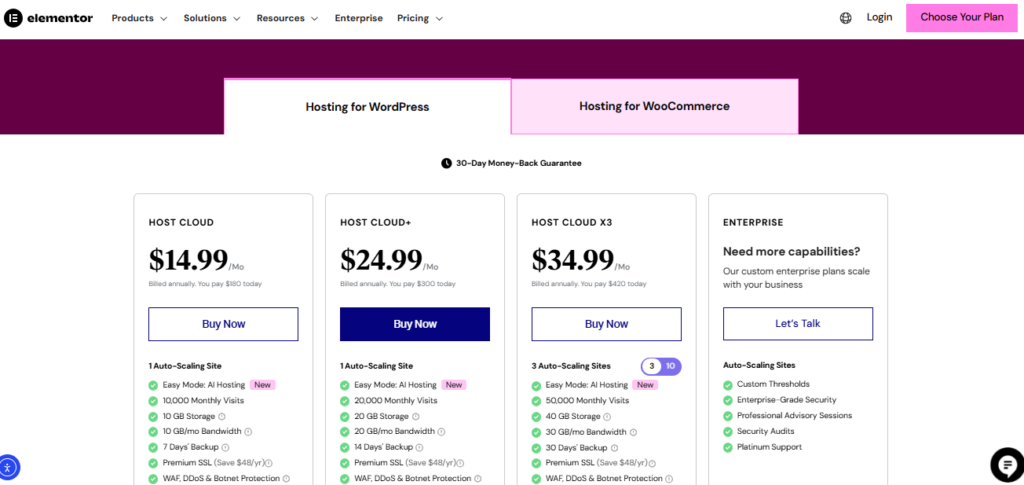
Pricing & Value for Money of Elementor Landing Page
When choosing a landing page builder, understanding pricing and value for money is essential. An Elementor landing page offers excellent options for both beginners and advanced users, making it one of the most cost-effective solutions on the market.
1. Free Version
Elementor offers a robust free version that allows you to create fully functional landing pages with:
- Drag-and-drop editing
- Basic templates and blocks
- Responsive design options
- Core widgets like images, text, buttons, and forms
For startups, bloggers, and small businesses, the free version is often enough to launch professional landing pages without spending a dime.
2. Elementor Pro
For advanced features, Elementor Pro starts at a competitive price, offering:
- Access to premium landing page templates
- Advanced widgets like slides, countdown timers, and forms
- Pop-up builder for lead generation
- Marketing integrations with email platforms, CRMs, and analytics tools
- Theme Builder to fully customize headers, footers, and more
Pro plans are flexible: you can choose from a single site license to multiple site licenses, providing excellent value for agencies and marketers managing multiple clients.
3. Value Compared to Other Builders
Compared to competitors like Divi, Beaver Builder, or Leadpages, Elementor offers:
- More features for a lower price
- Better design flexibility and templates
- Free version capable of launching a functional landing page
- Scalable pricing for personal websites and agencies alike
In short, an Elementor landing page gives you high-quality design, powerful conversion tools, and flexibility, all at a price that fits both beginners and professional marketers.
Templates and Ready-Made Blocks for Elementor Landing Page
One of the biggest advantages of an Elementor landing page is its library of pre-designed templates and ready-made blocks. These tools make it easy to build professional, high-converting landing pages quickly, without starting from scratch.
1. Wide Range of Pre-Built Templates
Elementor offers hundreds of pre-built landing page templates across various industries and niches, including:
- SaaS and software
- E-commerce and online stores
- Agencies and consulting
- Events and webinars
- Personal portfolios
These templates are fully customizable, so you can adjust layouts, colors, fonts, and images to match your brand. This saves hours of design work while ensuring your page looks professional and polished.
2. Ready-Made Blocks
In addition to full templates, Elementor provides ready-made content blocks, such as:
- Hero sections
- Testimonials
- Call-to-action (CTA) banners
- Pricing tables
- Contact forms
These blocks allow you to mix and match elements to build a landing page that fits your specific goals. For example, you can quickly add a testimonial section or a countdown timer without designing it from scratch.
3. Time-Saving and Consistent Design
Using templates and blocks ensures that your Elementor landing page maintains a consistent design style across sections, which improves user experience and boosts conversions. It also allows marketers and business owners to launch landing pages in minutes instead of hours or days.
4. Fully Customizable
While templates and blocks provide a strong starting point, Elementor still gives you full control. You can:
- Change colors, fonts, and layouts
- Add animations and interactive effects
- Adjust responsive settings for mobile and tablet
- Integrate with marketing tools and forms
This flexibility ensures that your Elementor landing page is not only fast to build but also unique and conversion-optimized.
Integrations and SEO Capabilities of Elementor Landing Page
An Elementor landing page is more than just visually appealing—it’s also built to work seamlessly with marketing tools and optimized for search engines. These two factors make it a powerful solution for businesses looking to generate leads and improve online visibility.
1. Marketing Integrations
Elementor allows you to connect your landing page with a wide range of third-party tools, making lead capture and marketing automation simple. Key integrations include:
- Email Marketing Platforms: Mailchimp, ConvertKit, ActiveCampaign, HubSpot
- CRM Systems: Salesforce, Zoho, HubSpot CRM
- Analytics Tools: Google Analytics, Facebook Pixel, Hotjar
- Payment Gateways: PayPal, Stripe, WooCommerce for e-commerce landing pages
These integrations ensure that you can track performance, manage leads, and optimize campaigns directly from your landing page, without needing extra plugins or coding knowledge.
2. SEO-Friendly Features
An Elementor landing page is built with clean, well-structured code, which helps search engines crawl and index your pages effectively. Some of its SEO advantages include:
- Proper use of heading tags (H1, H2, H3)
- Fast-loading pages to improve user experience and reduce bounce rates
- Schema markup support for rich results
- Easy integration with SEO plugins like Yoast SEO or Rank Math
These features make it easier for your landing page to rank on Google and attract organic traffic.
3. Combined Value
The combination of powerful integrations and SEO-friendly design makes an Elementor landing page not just a visually appealing tool, but a marketing powerhouse. Whether you are running a lead generation campaign, promoting a product, or building an email list, Elementor ensures your landing page is optimized for both performance and visibility.
Support, Community & Resources for Elementor Landing Page
One of the key reasons an Elementor landing page stands out is the strong support system, active community, and wealth of learning resources available. Whether you are a beginner or an experienced marketer, these resources make building and optimizing landing pages easier and more efficient.
1. Official Support
Elementor offers dedicated customer support for both free and Pro users:
- Free Users: Access to documentation, guides, and community forums.
- Pro Users: Priority support through live chat and email, ensuring timely solutions to issues.
This ensures that no matter your level of expertise, you can quickly get help when needed.
2. Active Community
Elementor has a large, active community of users, designers, and developers:
- Facebook Groups & Forums: Share ideas, ask questions, and get feedback.
- Online Tutorials & Webinars: Learn advanced techniques, design tips, and marketing strategies.
- User-Created Templates and Widgets: Expand your options with free or paid community contributions.
Being part of this community makes it easy to stay updated with trends and get inspiration for your landing pages.
3. Learning Resources
Elementor provides a variety of learning resources to help users create high-converting landing pages:
- Official Documentation & Guides – Step-by-step tutorials for all features.
- Video Tutorials & Webinars – Visual guides for beginners and advanced users.
- Blog and Case Studies – Best practices for design, SEO, and conversions.
These resources are especially valuable for marketers and business owners who want to maximize the performance of their Elementor landing page.
4. Combined Benefits
The combination of reliable support, an active community, and extensive resources ensures that creating an Elementor landing page is never a frustrating process. Users can learn, troubleshoot, and improve their landing pages at every stage, making Elementor a top choice for businesses and marketers.

Final Verdict: Why Elementor Landing Page Wins in 2026
After exploring its features, benefits, templates, integrations, SEO capabilities, and support system, it’s clear why an Elementor landing page remains the top choice for businesses and marketers in 2026.
1. Unmatched Ease of Use
Elementor’s drag-and-drop editor allows anyone—beginner or professional—to create visually stunning landing pages without writing a single line of code. This ease of use saves time, reduces frustration, and accelerates project launches.
2. Design Flexibility and Customization
With hundreds of pre-built templates and ready-made blocks, an Elementor landing page can be customized to match any brand, niche, or campaign goal. From hero sections to CTAs and pricing tables, every element can be tailored to drive conversions.
3. Mobile Responsiveness and Speed
All Elementor landing pages are fully responsive and optimized for fast loading on desktop and mobile devices. This ensures a smooth user experience, higher engagement, and better search engine rankings.
4. Conversion-Focused Features
Built-in forms, pop-ups, call-to-action buttons, and countdown timers make Elementor ideal for businesses looking to generate leads and sales. Integration with marketing tools and CRMs further enhances its conversion capabilities.
5. SEO and Marketing Integrations
An Elementor landing page is SEO-friendly by design, with clean code, schema support, and compatibility with top SEO plugins. Its seamless integration with email platforms, CRMs, and analytics tools allows marketers to track performance and optimize campaigns effectively.
6. Support, Community, and Resources
Elementor’s strong support system, active community, and extensive learning resources ensure that users are never left struggling. From tutorials to forums, help is always available, making it easier to create high-performing landing pages.
7. Pricing and Value
With a robust free version and competitively priced Pro plans, Elementor offers incredible value for individuals, businesses, and agencies alike. It combines advanced features, scalability, and affordability in one platform.
The Bottom Line
Whether you are launching a product, running a marketing campaign, or capturing leads, an Elementor landing page provides the perfect combination of usability, design, performance, and conversion-focused tools. In 2026, it continues to be one of the best landing page solutions available, helping businesses create professional, high-converting pages faster and more efficiently than ever.
By combining a high-performing Elementor landing page with a secure WordPress setup using tools like Sucuri WordPress plugin, you can ensure your landing pages are fast, protected, and optimized for conversions.
Frequently Asked Questions (FAQ) About Elementor Landing Page
1. What is an Elementor landing page?
An Elementor landing page is a web page built using the Elementor plugin for WordPress, specifically designed to capture leads, promote products, or drive conversions. It features a drag-and-drop editor, customizable templates, and conversion-focused tools.
2. How do I create an Elementor landing page?
To create an Elementor landing page, install the Elementor plugin on your WordPress site, choose a pre-built template or start from scratch, and use the drag-and-drop editor to add sections, widgets, and calls-to-action. Once finished, publish your page for visitors to see.
3. Is Elementor landing page mobile-friendly?
Yes! Every Elementor landing page is fully responsive, meaning it automatically adjusts for mobile, tablet, and desktop users. You can also customize mobile-specific layouts within the editor to ensure optimal performance on all devices.
4. Can I integrate an Elementor landing page with email marketing tools?
Absolutely. An Elementor landing page integrates seamlessly with popular email marketing platforms like Mailchimp, ConvertKit, and HubSpot, allowing you to capture leads directly from your landing page forms.
5. Do I need Elementor Pro to build a landing page?
No, you can create a functional Elementor landing page with the free version. However, Elementor Pro provides access to premium templates, advanced widgets, pop-ups, and marketing integrations, which help create more professional and high-converting pages.
6. How does an Elementor landing page help with SEO?
An Elementor landing page is built with clean code, supports proper heading structure, schema markup, and integrates with SEO plugins like Yoast or Rank Math. This ensures your landing page is optimized for search engines, improving visibility and organic traffic.
7. Can I use Elementor landing page templates for different industries?
Yes! Elementor offers a wide library of pre-built landing page templates tailored for various industries, including e-commerce, SaaS, consulting, events, and personal portfolios. Templates can be fully customized to match your brand and goals.
8. What makes Elementor landing page better than other builders?
An Elementor landing page combines ease of use, design flexibility, mobile responsiveness, conversion-focused features, and strong support. Compared to other builders like Divi, Beaver Builder, or Leadpages, it offers more features at a competitive price, making it ideal for beginners and professionals alike.


