
If you’re looking to speed up your WordPress website, the LiteSpeed Cache plugin is one of the most powerful tools available. Designed to improve page load times, reduce server load, and optimize your site for better SEO, this plugin offers both beginner-friendly features and advanced options for developers. In this guide, we’ll explore everything you need to know about the LiteSpeed Cache plugin, including its features, performance benefits, pricing, and how it compares to other popular caching solutions.
Table of Contents
What Is the LiteSpeed Cache Plugin?
The LiteSpeed Cache plugin is a powerful WordPress caching solution designed to significantly improve your website’s loading speed and overall performance. Caching is a technique that stores static copies of your web pages, so visitors can access your content faster without repeatedly querying the server. LiteSpeed Cache takes this a step further by offering advanced optimization features built specifically for WordPress sites running on LiteSpeed or compatible servers.
Unlike basic caching plugins, the LiteSpeed Cache plugin provides server-level caching, which is faster and more efficient than standard PHP-level caching. It also includes features like page caching, image optimization, database cleanup, and integration with Content Delivery Networks (CDNs). These features work together to reduce server load, improve SEO rankings, and deliver a smoother experience for site visitors.
The plugin is compatible with most popular WordPress themes and plugins, including WooCommerce, Elementor, and Gutenberg. This makes it a versatile choice for websites of all sizes—from personal blogs to high-traffic eCommerce stores.
Key Highlights of LiteSpeed Cache Plugin:
- Server-Level Caching: Fast, efficient, and reduces server resource usage.
- Automatic Optimization: Includes image compression, lazy loading, and minification of CSS/JS files.
- Database Optimization: Clean up unnecessary data to keep your site running smoothly.
- CDN Support: Works with most Content Delivery Networks for global speed improvements.
- Compatibility: Works with major WordPress themes, page builders, and plugins.
By using the LiteSpeed Cache plugin, website owners can ensure faster page load times, better user experience, and improved SEO performance—all essential factors in today’s competitive online environment.
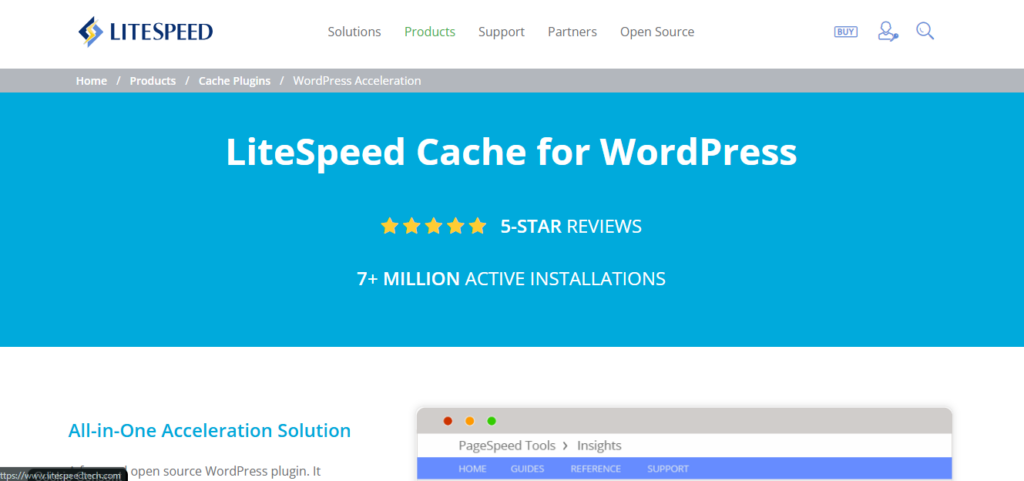
Key Features of LiteSpeed Cache Plugin
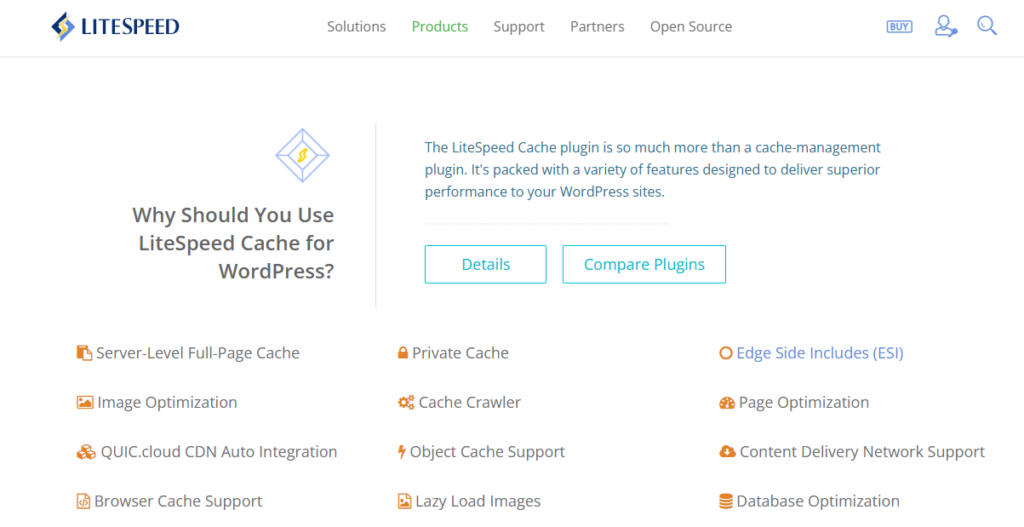
The LiteSpeed Cache plugin is not just a simple caching tool—it’s a full-featured performance optimization solution for WordPress. Here’s a detailed look at its key features and how they can help your website load faster and perform better.
1. Server-Level Caching
One of the standout features of the LiteSpeed Cache plugin is server-level page caching. Unlike typical caching plugins that work at the PHP level, server-level caching stores fully rendered pages, allowing them to be served instantly to visitors. This drastically reduces server load and improves page load times.
2. Image Optimization
The plugin offers built-in image optimization tools, including lazy loading, WebP conversion, and automatic image compression. Optimized images reduce page size without compromising quality, making your website faster and more efficient.
3. CSS, JavaScript, and HTML Minification
The LiteSpeed Cache plugin can automatically minify CSS, JavaScript, and HTML files, reducing file size and improving loading speed. It also supports combining files to reduce HTTP requests, further enhancing performance.
4. Database Optimization
Over time, WordPress databases accumulate unnecessary data, like post revisions, spam comments, and transient options. The plugin’s database optimization feature cleans up this data, keeping your website lean and fast.
5. Content Delivery Network (CDN) Integration
The plugin integrates smoothly with popular CDNs, including Cloudflare and QUIC.cloud. CDN support ensures that your content is delivered quickly to visitors worldwide, improving both speed and SEO rankings.
6. Advanced Caching Options
LiteSpeed Cache offers granular caching controls, including cache exclusions, logged-in user cache handling, and cache TTL (time-to-live) settings. This gives you full control over what gets cached and how long it stays cached.
7. E-Commerce Optimization
For WooCommerce users, the LiteSpeed Cache plugin includes features to optimize product pages, shopping carts, and checkout pages without interfering with dynamic content. This ensures that eCommerce websites remain fast and functional.
8. Browser Caching and HTTP/2 Push
The plugin supports browser caching and HTTP/2 push, which allows modern browsers to preload critical resources, further reducing page load time for repeat visitors.
By offering these comprehensive features, the LiteSpeed Cache plugin goes beyond basic caching to deliver a complete performance optimization solution for WordPress websites. Whether you run a blog, business site, or eCommerce store, these features ensure a faster, smoother, and more SEO-friendly experience for your visitors.
How LiteSpeed Cache Works
The LiteSpeed Cache plugin works by storing a pre-generated version of your website pages and serving them directly to visitors, which significantly reduces page load times. Unlike standard caching plugins that operate at the WordPress/PHP level, LiteSpeed Cache operates at the server level, making it faster and more efficient. Here’s a simple breakdown of how it works:
1. Server-Level Page Caching
When a visitor requests a page, the plugin serves a cached HTML version instead of dynamically generating the page from WordPress and the database. This reduces server processing time and ensures that pages load almost instantly.
2. Dynamic Content Handling
LiteSpeed Cache intelligently handles dynamic content like logged-in user data, shopping carts, or checkout pages. It can exclude certain pages from caching or serve personalized content while still benefiting from caching on static parts of the site.
3. Optimization Features
Beyond caching, the plugin optimizes files and resources for faster delivery:
- Minifies CSS, JavaScript, and HTML to reduce file sizes.
- Compresses and lazy-loads images for quicker page rendering.
- Preloads critical content using features like HTTP/2 push.
4. Browser Caching and CDN Integration
LiteSpeed Cache can instruct browsers to store certain files locally (browser caching), so returning visitors experience near-instant loading. It also integrates with CDNs to serve content from servers closest to the visitor, improving global performance.
5. Automatic Cache Management
The plugin automatically clears outdated caches when content is updated, ensuring visitors always see the most recent version of your website. It can also pre-cache pages to keep your site fast at all times.
Summary
In simple terms, the LiteSpeed Cache plugin works by combining server-level caching, smart dynamic content handling, and resource optimization to deliver faster, more reliable WordPress websites. This makes it one of the most powerful and efficient caching solutions for WordPress users.

Pricing: Free vs Premium
The LiteSpeed Cache plugin offers both a free version and premium features, making it accessible to a wide range of WordPress users. Understanding the difference between free and paid options can help you decide which version is best for your website’s needs.
1. Free Version
The free version of the LiteSpeed Cache plugin provides most core features that a typical WordPress site needs to improve speed and performance. Some key highlights include:
- Server-level page caching
- Image optimization with lazy loading
- CSS, JavaScript, and HTML minification
- Database cleanup and optimization
- Basic CDN integration
For many small websites, blogs, and even medium-sized sites, the free version is often sufficient to see a noticeable improvement in site speed.
2. Premium Features
The premium version of LiteSpeed Cache is usually available via QUIC.cloud services, which provide advanced optimization options such as:
- Image optimization at scale (WebP conversion, bulk image optimization)
- Critical CSS generation to improve page load times
- Advanced caching rules for dynamic content
- Edge Side Includes (ESI) for personalized content caching
- Priority support for troubleshooting and setup
Premium services are generally billed based on usage, like the number of image optimizations or requests made to the QUIC.cloud servers.
3. Which Version Should You Choose?
- Free Version: Ideal for blogs, small business sites, and beginners. It offers substantial caching and optimization features at no cost.
- Premium Version: Recommended for large websites, eCommerce stores, or high-traffic sites where advanced optimization, critical CSS, and ESI support can significantly enhance performance.
Using the LiteSpeed Cache plugin, even the free version can dramatically improve website speed. Upgrading to premium is only necessary if your site requires advanced features or serves a large volume of visitors.
Performance Benefits of LiteSpeed Cache Plugin
The LiteSpeed Cache plugin is widely recognized for its ability to dramatically improve website performance. By leveraging server-level caching, advanced optimization features, and smart resource management, it ensures faster page loading, better user experience, and higher SEO rankings. Here’s a closer look at the performance benefits you can expect:
1. Faster Page Load Times
With server-level caching, the LiteSpeed Cache plugin delivers pre-generated pages instantly to visitors. This reduces server processing time and ensures that your site loads in a fraction of the time compared to uncached pages. Faster load times lead to higher engagement and lower bounce rates.
2. Reduced Server Load
By serving cached pages instead of generating pages dynamically for every visitor, the LiteSpeed Cache plugin significantly reduces CPU and memory usage. This makes your site more stable during traffic spikes and prevents slowdowns during high visitor volume.
3. Optimized Resource Delivery
The plugin minifies CSS, JavaScript, and HTML, compresses images, and uses lazy loading to reduce page size and HTTP requests. Optimized resources mean pages render faster, improving both performance scores and user experience.
4. Improved SEO Performance
Website speed is a critical factor in Google’s ranking algorithm. By using the LiteSpeed Cache plugin, your faster-loading pages can contribute to better search engine rankings, higher visibility, and more organic traffic.
5. Enhanced User Experience
Visitors expect fast websites. Sites optimized with the LiteSpeed Cache plugin provide smoother navigation, quicker content display, and better overall user experience. This can lead to higher engagement, longer sessions, and more conversions.
Summary
In essence, the LiteSpeed Cache plugin provides measurable performance benefits by speeding up page loads, reducing server load, optimizing resources, and enhancing SEO and user experience. Whether you run a blog, business site, or eCommerce store, these benefits make it a must-have tool for WordPress performance optimization.
LiteSpeed Cache vs Other Cache Plugins
When it comes to speeding up a WordPress website, there are many caching plugins available. However, the LiteSpeed Cache plugin stands out from the competition due to its server-level caching, advanced optimization features, and seamless WordPress integration. Here’s a detailed comparison with some of the most popular WordPress cache plugins.
1. LiteSpeed Cache vs W3 Total Cache
- LiteSpeed Cache plugin: Uses server-level caching, offers image optimization, database cleanup, and CDN integration. It also handles dynamic content efficiently, making it suitable for eCommerce sites.
- W3 Total Cache: Works at the PHP level, requires more manual setup, and doesn’t offer built-in image optimization. Some advanced features are only available in the paid version.
2. LiteSpeed Cache vs WP Super Cache
- LiteSpeed Cache plugin: Pre-generates pages at the server level, supports HTTP/2 push, and provides advanced caching rules for logged-in users.
- WP Super Cache: Simple page caching at the PHP level, easier for beginners but lacks advanced optimization features. Not ideal for large or dynamic sites.
3. LiteSpeed Cache vs WP Rocket
- LiteSpeed Cache plugin: Free version includes most essential features and integrates tightly with LiteSpeed servers. Premium features are available through QUIC.cloud.
- WP Rocket: Premium-only plugin, very user-friendly with many optimization features, but costs $59/year for a single site. LiteSpeed Cache can achieve similar performance without a paid license.
4. Why LiteSpeed Cache Stands Out
- Server-Level Caching: Faster than PHP-level caching used by most competitors.
- Advanced Optimization: Built-in image compression, minification, database cleanup, and CDN support.
- E-Commerce Friendly: Optimized for WooCommerce and other dynamic content platforms.
- Free Core Features: Most caching and optimization functions are free, unlike WP Rocket which is premium-only.
Summary
While other cache plugins like W3 Total Cache, WP Super Cache, and WP Rocket offer valuable features, the LiteSpeed Cache plugin is unique in its combination of speed, server-level caching, free core features, and advanced optimization tools. This makes it an excellent choice for both beginners and advanced WordPress users who want to maximize site performance.
“While the LiteSpeed Cache plugin offers a robust free solution, premium caching plugins like WP Rocket also provide advanced optimization features and user-friendly interfaces.”
User Experience & Ease of Setup
One of the reasons the LiteSpeed Cache plugin is so popular is its user-friendly interface and relatively simple setup process. Even though it offers advanced features for optimization, the plugin is designed to be accessible to both beginners and experienced WordPress users.
1. Simple Installation
Installing the LiteSpeed Cache plugin is straightforward. You can install it directly from the WordPress plugin repository, activate it, and immediately start benefiting from server-level caching. Most default settings work well for small to medium websites, meaning you don’t need to configure every option manually.
2. Intuitive Dashboard
The plugin comes with a clean and intuitive dashboard that organizes key features like caching, image optimization, database cleanup, and CDN integration. Users can easily navigate through tabs to configure settings without feeling overwhelmed.
3. One-Click Optimization
For beginners or users who don’t want to dive deep into settings, the LiteSpeed Cache plugin offers one-click optimization options. Features like “Optimize Images,” “Purge All Cache,” and “Preload Cache” can be activated with a single click, making it easy to start improving site speed right away.
4. Advanced Settings for Experienced Users
While the plugin is easy for beginners, it also provides advanced settings for those who want full control. You can customize caching rules, enable ESI (Edge Side Includes), configure critical CSS, and set CDN integration for maximum performance.
5. Helpful Documentation and Support
The LiteSpeed Cache plugin offers detailed documentation, tutorials, and support forums. For users who opt for QUIC.cloud premium services, priority support is available to help with setup or troubleshooting.
Summary
The LiteSpeed Cache plugin strikes a balance between ease of use and advanced functionality. Beginners can benefit from its one-click optimizations and intuitive interface, while advanced users can customize settings to maximize site performance. This combination makes it one of the most user-friendly and versatile caching solutions for WordPress.
Security & Advanced Settings of LiteSpeed Cache Plugin
The LiteSpeed Cache plugin is not only about speed—it also offers advanced settings and security features that help keep your WordPress website safe while maintaining optimal performance. These options are particularly useful for developers, eCommerce sites, and users who want granular control over caching and resource management.
1. Cache Exclusions
The plugin allows you to exclude specific pages, posts, or user roles from caching. This is important for pages with sensitive or dynamic content, such as checkout pages in WooCommerce or membership areas. Proper cache exclusion ensures that users always see accurate, real-time information without compromising speed.
2. Edge Side Includes (ESI)
ESI lets you cache the majority of a page while keeping dynamic content (like shopping carts or user-specific messages) fresh. This advanced caching method is ideal for eCommerce websites or sites with personalized content.
3. HTTP/2 Push
The plugin supports HTTP/2 server push, which allows critical CSS, JavaScript, and images to be sent to browsers proactively. This reduces page load times and ensures that essential resources are available to users as soon as possible.
4. Browser Cache Settings
The LiteSpeed Cache plugin enables browser caching, allowing visitors’ browsers to store static files locally. This reduces load times for returning visitors and lowers server requests, enhancing both performance and security by limiting repeated requests.
5. Security Enhancements
While LiteSpeed Cache is primarily a performance plugin, its advanced settings can help improve website security indirectly:
- Prevents caching of sensitive user data.
- Supports secure integration with CDNs.
- Allows careful control over what content is exposed to visitors.
6. Advanced Control for Developers
For developers, the plugin provides granular control over:
- Cache TTL (time-to-live) for pages and objects
- Cache purging rules for dynamic content
- Integration with external optimization services like QUIC.cloud
These options ensure that complex websites can leverage caching without breaking dynamic functionality or user experience.
Summary
The LiteSpeed Cache plugin combines advanced performance optimizations with security-conscious settings, making it suitable for both simple blogs and complex, high-traffic websites. Features like cache exclusions, ESI, HTTP/2 push, and granular developer controls give users full confidence that their website will remain fast, functional, and secure.
Who Should Use LiteSpeed Cache Plugin?
The LiteSpeed Cache plugin is designed for a wide range of WordPress users—from beginners to advanced site owners. Its combination of server-level caching, advanced optimization features, and ease of use makes it suitable for nearly any website that wants to improve performance and user experience.
1. Bloggers and Content Creators
Bloggers, news sites, and content-heavy websites benefit greatly from the LiteSpeed Cache plugin. Faster page loads mean better reader retention, reduced bounce rates, and improved SEO rankings. Even the free version provides significant speed improvements without complex setup.
2. Small to Medium Business Websites
Business websites that rely on fast-loading pages for customer engagement and lead generation will see performance gains from LiteSpeed Cache plugin. Optimized resources, database cleanup, and CDN integration help ensure professional sites remain responsive even during traffic spikes.
3. eCommerce Stores
WooCommerce and other online stores benefit from LiteSpeed Cache plugin’s dynamic content handling. Features like ESI (Edge Side Includes) allow caching of most of the site while keeping product pages, carts, and checkout processes dynamic. This ensures fast, smooth shopping experiences without breaking personalized content.
4. Developers and Web Agencies
Developers and agencies managing multiple client websites appreciate the advanced settings and developer-friendly options in the LiteSpeed Cache plugin. Granular control over caching, HTTP/2 push, critical CSS generation, and CDN integration makes it ideal for complex websites and high-traffic projects.
5. Sites with Global Audience
Websites that receive traffic from around the world benefit from the LiteSpeed Cache plugin’s CDN integration. Combined with optimized images and server-level caching, it ensures that visitors from any location experience fast load times.
Summary
The LiteSpeed Cache plugin is suitable for any WordPress site that wants to improve performance, speed, and user experience. Whether you’re a blogger, business owner, online store operator, developer, or managing a site with a global audience, LiteSpeed Cache provides tools to ensure fast, reliable, and optimized website performance.
Final Verdict: Pros & Cons of LiteSpeed Cache Plugin
After exploring its features, performance benefits, and ease of use, it’s clear that the LiteSpeed Cache plugin is a powerful tool for optimizing WordPress websites. Here’s a concise look at the pros and cons to help you decide if it’s the right choice for your site.
✅ Pros
- Server-Level Caching: Offers faster page load times than most PHP-level caching plugins.
- Advanced Optimization Tools: Includes image compression, minification, lazy loading, database cleanup, and critical CSS.
- Free Core Features: Most essential caching and optimization features are available at no cost.
- Dynamic Content Handling: ESI and cache exclusions ensure personalized content like shopping carts or membership pages function properly.
- CDN Integration: Works seamlessly with popular CDNs, improving global website performance.
- Ease of Use: Intuitive dashboard, one-click optimization, and helpful documentation make setup easy for beginners.
- Developer-Friendly: Advanced settings, HTTP/2 push, and QUIC.cloud integration allow full control for developers and agencies.
❌ Cons
- Premium Services via QUIC.cloud: Some advanced features like image optimization at scale or priority support require a paid QUIC.cloud subscription.
- LiteSpeed Server Recommended: While it works on other servers, full performance benefits are best achieved on LiteSpeed or OpenLiteSpeed servers.
- Learning Curve for Advanced Features: Beginners may need time to understand advanced caching rules, ESI, and critical CSS settings.
Summary
The LiteSpeed Cache plugin is one of the most comprehensive and effective caching solutions for WordPress. Its combination of speed, optimization, ease of use, and free features makes it suitable for bloggers, businesses, eCommerce stores, and developers alike. While some advanced features require a QUIC.cloud subscription and the best performance comes from LiteSpeed servers, the free version alone is powerful enough for most WordPress websites.
Overall, the LiteSpeed Cache plugin delivers fast-loading, optimized, and reliable WordPress performance, making it highly recommended for anyone serious about improving their site speed and user experience.


