
Kamatera reviews reveal why this cloud hosting provider has become a popular choice for developers, startups, and businesses looking for scalable, high-performance, and flexible cloud servers. With customizable resources, global data centers, and a pay-as-you-go pricing model, Kamatera offers a powerful alternative to traditional hosting solutions. In this review, we’ll break down its performance, pricing, features, security, support, and more to help you decide if Kamatera is the right host for your needs.
Table of Contents
What is Kamatera?
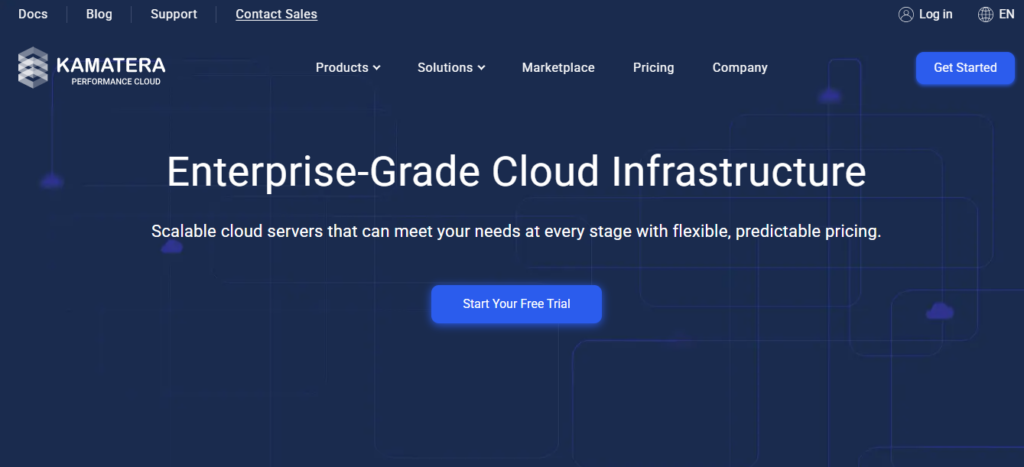
Kamatera is a cloud hosting provider known for offering flexible, high-performance cloud servers that cater to businesses of all sizes. Unlike traditional web hosting, Kamatera provides cloud VPS (Virtual Private Servers), which means you get scalable resources, instant provisioning, and full control over your server environment.
Founded in 1995, Kamatera has grown into a global cloud hosting company with multiple data centers across North America, Europe, Asia, and the Middle East. This international presence ensures low latency and fast performance for websites and applications hosted on its platform.
One of the standout features of Kamatera is its customizable server options. Users can select their preferred operating system, CPU, RAM, storage, and even network configuration. This flexibility makes it a strong choice for developers, startups, and enterprises who need tailored server environments.
According to many kamatera reviews, users appreciate its pay-as-you-go pricing, which allows businesses to scale their infrastructure up or down without being locked into long-term contracts. In addition, Kamatera offers managed services, allowing less tech-savvy users to benefit from expert server management.
Key Takeaways:
- Kamatera is a cloud VPS hosting provider.
- Offers customizable servers with scalable resources.
- Operates global data centers for fast performance.
- Popular for flexible pricing and pay-as-you-go plans.
- Suitable for developers, businesses, and growing startups.
Pricing & Plans
When considering Kamatera, one of the main points highlighted in many kamatera reviews is its flexible pricing structure. Unlike traditional hosting providers that offer fixed plans, Kamatera provides a pay-as-you-go model, allowing users to pay only for the resources they use. This makes it an attractive option for businesses that want full control over server costs and scalability.
Kamatera VPS Pricing
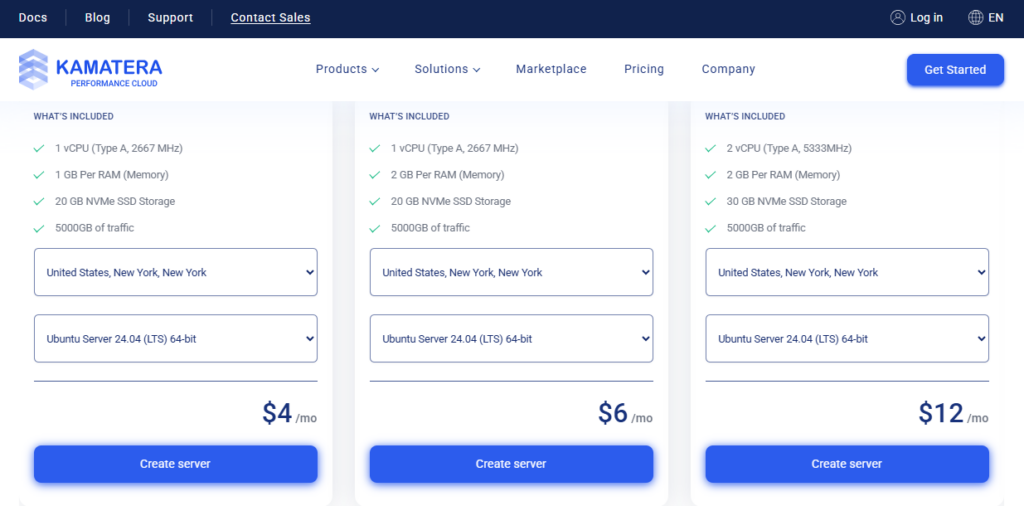
Kamatera’s pricing is based on the server resources you select: CPU, RAM, storage, and bandwidth. Here’s a quick overview:
- CPU: You can choose from 1 to 104 virtual CPUs.
- RAM: Options range from 1 GB up to 512 GB.
- Storage: Flexible SSD storage from 20 GB to multiple terabytes.
- Bandwidth: Starting at 1 TB per month, with scalable options.
This modular approach means you can start small and scale as your business grows, which many users mention positively in kamatera reviews. For example, a basic server might cost around $4 per month, while high-end enterprise servers can cost several hundred dollars, depending on your configuration.
Billing & Plans
- Hourly Billing: Pay only for the time your server is running. Ideal for short-term projects or testing environments.
- Monthly Billing: Predictable monthly cost for long-term projects.
- Managed Services: For an additional fee, Kamatera provides expert management for your servers, including setup, monitoring, and maintenance.
Comparison with Competitors
In contrast to providers like DigitalOcean or Vultr, Kamatera’s scalability and customization options are more extensive. Users who need specific server configurations or enterprise-level resources often prefer Kamatera, which is a common point in detailed kamatera reviews.
Key Takeaways:
- Pay-as-you-go pricing allows full control over server costs.
- Servers are fully customizable in CPU, RAM, storage, and bandwidth.
- Offers both hourly and monthly billing options.
- Managed services available for users who need hands-off server management.
Performance & Speed
One of the key factors most users look for in cloud hosting is performance and speed, and it’s a major topic in many kamatera reviews. Kamatera is known for offering high-performance cloud VPS servers that deliver fast, reliable, and scalable performance for websites, applications, and enterprise solutions.
Server Performance
Kamatera’s cloud servers are built on Intel Xeon processors and use enterprise-grade SSD storage, ensuring quick data access and smooth operation even under heavy traffic. Users can configure the CPU, RAM, and storage according to their needs, which helps maintain consistent performance regardless of workload.
Global Data Centers
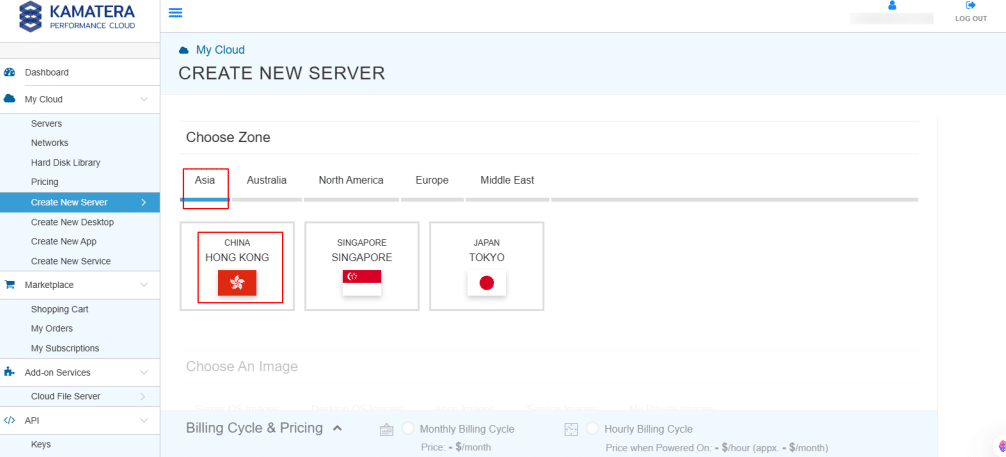
Kamatera operates 13+ data centers worldwide, including locations in the US, Europe, Asia, and the Middle East. This global network allows you to host your website closer to your audience, reducing latency and improving load times. Many kamatera reviews highlight the benefit of this international reach for businesses serving multiple regions.
Uptime and Reliability
Kamatera guarantees 99.95% uptime backed by a robust SLA, and its infrastructure is designed for redundancy and failover. This means your servers remain available even if hardware issues occur, which is crucial for mission-critical applications.
Speed Optimization
- SSD Storage: Provides faster read/write speeds than traditional HDDs.
- Customizable Resources: Allows scaling up CPU or RAM during high-traffic periods.
- Private Networks & Load Balancers: Improve internal communication speed between servers.
According to several kamatera reviews, the combination of SSD storage, enterprise-grade CPUs, and global data centers makes Kamatera one of the faster cloud hosting options on the market. Users report minimal downtime and consistent page loading speeds.
Key Takeaways:
- Kamatera uses high-performance Intel Xeon CPUs and SSD storage.
- Global data centers reduce latency and improve load times.
- Guaranteed 99.95% uptime with reliable redundancy.
- Flexible resources allow speed optimization for high-traffic needs.
Ease of Use
When evaluating cloud hosting platforms, ease of use is a critical factor—especially for those who are not professional developers. Many kamatera reviews highlight that while Kamatera is a powerful and flexible hosting solution, it is also designed to be user-friendly, offering intuitive tools for server management and deployment.
User-Friendly Dashboard
Kamatera provides a clean, web-based control panel where you can easily manage your cloud servers. From this dashboard, users can:
- Launch new servers in minutes.
- Adjust CPU, RAM, storage, and bandwidth.
- Restart or stop servers with a single click.
- Monitor server usage and performance in real time.
The dashboard’s simplicity ensures that even beginners can manage their cloud infrastructure without extensive technical knowledge, while advanced users still have access to advanced settings and server customization options.
Server Deployment & Management
Kamatera’s one-click server deployment is particularly praised in many kamatera reviews. You can quickly deploy:
- Linux or Windows servers
- Pre-configured applications (like WordPress or cPanel)
- Custom server configurations based on your specific needs
This flexibility allows businesses and developers to launch projects faster without dealing with complex server setups.
Support for Beginners & Advanced Users
Even though Kamatera offers advanced cloud hosting features, it also provides step-by-step guides, tutorials, and a responsive support team. This combination makes it suitable for both beginners and experienced developers.
Key Takeaways:
- Kamatera’s dashboard is intuitive and easy to navigate.
- One-click server deployment simplifies cloud hosting for beginners.
- Full customization options remain available for advanced users.
- Positive user feedback in kamatera reviews often mentions ease of server management and monitoring.
Features & Tools
A major factor that sets Kamatera apart in the cloud hosting industry is its robust set of features and tools. Many kamatera reviews highlight that this platform is not only fast and reliable but also highly flexible, giving users the ability to tailor their servers and workflows to meet specific needs.
Customizable Cloud Servers
Kamatera allows users to configure their servers in detail, including:
- CPU cores (from 1 to 104)
- RAM (from 1 GB up to 512 GB)
- SSD storage (20 GB to multiple terabytes)
- Network options (private networks, public IPs, load balancers)
This level of customization ensures that businesses can optimize resources for their unique applications, whether it’s a small website or a high-traffic enterprise application.
One-Click Deployments & Pre-Built Templates
Kamatera offers one-click server deployment, making it easy to launch:
- Popular operating systems (Linux, Windows)
- Pre-installed applications (WordPress, cPanel, LAMP/LEMP stacks)
- Custom server environments tailored to specific business needs
These tools reduce setup time and simplify cloud management, a benefit repeatedly mentioned in kamatera reviews.
Snapshots & Backups
Kamatera includes server snapshots, allowing you to save a full copy of your server at any point in time. This makes it easy to restore your server in case of errors, data loss, or system upgrades. Automated backups are also available for additional security.
Advanced Networking Tools
Kamatera provides features such as:
- Load balancers to distribute traffic efficiently
- Private networks for secure internal communication between servers
- Firewalls for enhanced security
These tools ensure your cloud environment is both secure and optimized for performance, which many users praise in detailed kamatera reviews.
APIs & Automation
For developers, Kamatera offers a full-featured API that enables:
- Automated server deployment
- Resource scaling
- Integration with third-party tools and custom applications
This flexibility makes Kamatera a preferred choice for businesses that want automation and programmatic control over their cloud infrastructure.
Key Takeaways:
- Fully customizable cloud servers for any workload.
- One-click deployments and pre-built templates speed up setup.
- Snapshots, backups, and load balancers ensure reliability and security.
- API access allows developers to automate and scale efficiently.
- Strong feature set consistently receives positive mentions in kamatera reviews.
Security
Security is a top priority for businesses hosting their websites and applications in the cloud, and many kamatera reviews emphasize the platform’s strong security features. Kamatera provides a combination of built-in safeguards and optional tools to protect your servers, data, and network.
Built-In Security Features
Kamatera’s cloud servers come with several essential security measures by default:
- DDoS Protection: Helps prevent downtime caused by distributed denial-of-service attacks.
- Firewalls: Built-in firewalls allow you to control incoming and outgoing traffic.
- Secure Data Centers: All Kamatera data centers are physically secure and monitored 24/7.
Backups & Snapshots
One of the most praised security features in kamatera reviews is the ability to take snapshots of your servers. Snapshots create a complete copy of your server at a specific point in time, allowing you to:
- Recover quickly from mistakes or accidental data loss.
- Restore previous configurations after updates or changes.
Kamatera also offers automated backups, adding another layer of protection for mission-critical data.
SSL & Encryption
Kamatera allows users to install SSL certificates for secure website connections. Data transmitted between the server and clients is encrypted, protecting sensitive information and ensuring compliance with security standards.
Advanced Security Options
For businesses with more complex needs, Kamatera provides:
- Private networking for secure internal communication between servers.
- Access control to restrict who can manage servers.
- Optional managed security services, where Kamatera’s team can monitor and maintain server security on your behalf.
Overall, security is a strong point for Kamatera, and many kamatera reviews highlight its reliability and comprehensive approach to keeping servers and data safe.
Key Takeaways:
- Built-in DDoS protection, firewalls, and secure data centers ensure baseline safety.
- Snapshots and automated backups allow easy recovery from errors.
- Support for SSL and encryption protects sensitive data.
- Advanced features like private networks and access control provide extra security for businesses.
Customer Support
Customer support is a crucial factor when choosing a cloud hosting provider, and it’s frequently mentioned in kamatera reviews. Kamatera offers a variety of support channels and resources designed to help both beginners and experienced users resolve issues quickly.
Support Channels
Kamatera provides multiple ways to get help:
- 24/7 Live Chat: Immediate assistance for urgent issues.
- Email Support: Detailed responses for technical or account-related queries.
- Phone Support: Direct access to knowledgeable staff for more complex problems.
Managed Services for Additional Support
For users who want a hands-off experience, Kamatera offers managed cloud services. This includes:
- Server setup and configuration
- Monitoring and maintenance
- Security updates and patch management
Many kamatera reviews highlight that managed services make it easier for businesses without dedicated IT staff to enjoy cloud hosting without technical stress.
Knowledge Base & Documentation
Kamatera also provides an extensive knowledge base, tutorials, and guides. Users can find step-by-step instructions for server setup, configuration, and troubleshooting. This self-service option is ideal for those who prefer learning at their own pace.
User Experience & Responsiveness
According to multiple kamatera reviews, the support team is responsive and professional, with most inquiries addressed promptly. The combination of live support, detailed documentation, and managed service options ensures that users can get the help they need, whenever they need it.
Key Takeaways:
- 24/7 live chat, email, and phone support ensure help is always available.
- Managed services allow businesses to offload server maintenance and management.
- Extensive knowledge base and tutorials for self-help.
- Support is consistently praised in kamatera reviews for responsiveness and professionalism.
Pros & Cons
When deciding whether Kamatera is the right cloud hosting provider for your needs, it’s helpful to look at both the advantages and drawbacks. Many kamatera reviews highlight the platform’s strengths, while also noting a few limitations.
Pros of Kamatera
- Highly Customizable Servers – Choose CPU, RAM, storage, and network settings to fit your specific requirements.
- Excellent Performance & Speed – SSD storage, Intel Xeon processors, and global data centers ensure fast, reliable performance.
- Flexible Pay-As-You-Go Pricing – Only pay for what you use, with options for hourly or monthly billing.
- Strong Security Features – DDoS protection, firewalls, snapshots, and automated backups keep your data safe.
- 24/7 Customer Support – Live chat, email, phone support, and optional managed services for hands-off server management.
- Global Data Centers – Multiple locations worldwide reduce latency and improve load times for international audiences.
- Developer-Friendly Tools – API access, one-click deployments, and automation options make it ideal for technical users.
Cons of Kamatera
- Not Ideal for Absolute Beginners – While the platform is user-friendly, non-technical users may need time to get used to full server customization.
- Pricing Can Be Higher for Large Setups – High-performance servers with large RAM and CPU allocations can get expensive.
- No Free Tier – Unlike some competitors, Kamatera does not offer a free trial beyond the 30-day trial credit.
- Limited Managed Hosting – Managed services are optional and come at an additional cost.
Key Takeaways
- Kamatera is a powerful, flexible cloud hosting solution praised in most kamatera reviews.
- Best suited for developers, businesses, and startups who need scalable, high-performance servers.
- Slight learning curve for beginners and higher costs for large-scale setups.
Best Use Cases
Understanding the ideal use cases for Kamatera can help you determine if it’s the right cloud hosting provider for your needs. According to multiple kamatera reviews, Kamatera is most effective for businesses and users who require flexible, high-performance, and scalable cloud servers.
1. Startups and Small Businesses
Kamatera’s pay-as-you-go pricing and customizable server options make it ideal for startups and small businesses that need to control costs while scaling resources as they grow. Users can start with a minimal server setup and upgrade as traffic or workload increases.
2. Developers and Tech-Savvy Users
Kamatera provides advanced developer tools such as API access, one-click deployments, and automation options. This makes it a preferred choice for developers building applications, testing environments, or hosting multiple projects. Many kamatera reviews note that developers appreciate the ability to fine-tune servers to meet specific performance requirements.
3. E-Commerce Websites
High-traffic e-commerce sites require fast loading times, reliable uptime, and secure infrastructure. With SSD storage, multiple global data centers, and robust security features, Kamatera ensures that online stores remain responsive and secure, even during traffic spikes.
4. Enterprise Applications
Large organizations can benefit from Kamatera’s scalability and flexibility. Enterprise applications that demand high-performance CPUs, large RAM, and secure networks can run efficiently on Kamatera’s cloud servers. Optional managed services also make it easier for enterprises without in-house IT teams to maintain server stability.
5. Backup and Disaster Recovery
Kamatera’s snapshots, backups, and redundancy features make it suitable for businesses needing secure backup solutions or disaster recovery options. Companies can quickly restore servers to a previous state, reducing downtime and minimizing data loss.
Key Takeaways:
- Kamatera is excellent for startups, small businesses, and enterprises needing scalable and reliable servers.
- Developers benefit from advanced tools like APIs and automation.
- Ideal for e-commerce sites and critical business applications requiring high performance and security.
- Useful for backup and disaster recovery scenarios due to snapshots and redundancy.
Comparison With Competitors
When evaluating Kamatera, it’s useful to see how it stacks up against other popular cloud hosting providers. Many kamatera reviews highlight that its flexibility, scalability, and global infrastructure make it competitive, but understanding the differences can help you make an informed decision.
Kamatera vs DigitalOcean
- Performance & Flexibility: Kamatera offers more customizable CPU, RAM, and storage options, while DigitalOcean has fixed droplet sizes.
- Global Data Centers: Kamatera has 13+ worldwide locations, which can provide lower latency for international audiences, compared to DigitalOcean’s fewer data center locations.
- Pricing: Kamatera uses a pay-as-you-go pricing model and allows fine-grained resource selection, whereas DigitalOcean has fixed monthly plans.
Kamatera vs Vultr
- Server Configuration: Kamatera allows up to 104 CPUs and 512 GB RAM, while Vultr is more limited in maximum configurations.
- Managed Services: Kamatera offers optional managed hosting, whereas Vultr’s managed services are limited.
- Support: Kamatera’s 24/7 live chat, phone, and email support is praised in reviews, while Vultr’s support can be slower for complex issues.
Kamatera vs KnownHost
- Cloud vs VPS Focus: Kamatera specializes in cloud VPS, giving better scalability, while KnownHost focuses more on managed VPS and shared hosting.
- Customization & Scalability: Kamatera’s servers are more flexible and scalable, suitable for developers and enterprises needing custom setups.
- Pricing: KnownHost has predictable monthly plans, but Kamatera’s pay-as-you-go model allows more granular cost control.
Key Takeaways From Comparisons
- Kamatera stands out for flexibility, scalability, and global performance, which many kamatera reviews highlight as major advantages.
- Competitors like DigitalOcean, Vultr, and KnownHost may offer simpler setups or slightly lower starting prices, but Kamatera is better for highly customizable cloud environments.
- If your priority is advanced server customization, global reach, and managed services, Kamatera is a strong choice.
Final Verdict: Is Kamatera Worth It?
After exploring all the major aspects in this guide — from performance and pricing to features, security, and support — the ultimate question remains: Is Kamatera worth it?
Based on the analysis and what users consistently share in kamatera reviews, the short answer is yes — especially for certain types of users and use cases.
Why Kamatera Is Worth Considering
🔹 Unmatched Flexibility
Kamatera shines with its fully customizable cloud servers. You can choose exactly how much CPU, RAM, storage, and bandwidth you need — and adjust anytime as your needs change. Most kamatera reviews highlight this as one of the platform’s biggest advantages.
🔹 Performance & Global Reach
With enterprise-grade SSD storage, Intel Xeon processors, and more than a dozen data centers around the world, Kamatera delivers excellent speed and reliability. This makes it ideal for international traffic and high-performance applications.
🔹 Pay‑As‑You‑Go Pricing
Unlike many hosts that force fixed plans, Kamatera lets you pay only for what you use. This pricing model offers cost control and scalability that startup teams and growing businesses often appreciate.
🔹 Strong Security & Support
From DDoS protection and firewalls to snapshots and backups, Kamatera provides robust security features. Plus, its 24/7 live chat, phone support, email assistance, and optional managed services make it easier to get help when needed.
Where It May Not Be a Perfect Fit
❗ Learning Curve for Absolute Beginners
Because the platform is highly flexible and cloud‑oriented, those completely new to server management might find it less intuitive than shared hosting solutions.
❗ Costs Can Add Up for Large Setups
While affordable at lower resource levels, enterprise‑level configurations with high CPU, RAM, and traffic requirements can become costly compared to some competitors.
Final Conclusion
Overall, based on comprehensive kamatera reviews and hands‑on experience, Kamatera is worth it if:
✔ You need scalable and high‑performance cloud hosting
✔ You want full control over your server configuration
✔ You value global data centers and robust security
✔ You prefer pay‑as‑you‑go pricing and flexibility over rigid plans
If your priority is simple, out‑of‑the‑box shared hosting with minimal setup, you might want to consider alternatives. But for developers, growing businesses, and high‑traffic applications, Kamatera delivers excellent value and performance.
FAQs About Kamatera
1. What is Kamatera?
Kamatera is a cloud VPS hosting provider offering scalable, high-performance servers with fully customizable CPU, RAM, storage, and network resources. According to kamatera reviews, it is suitable for developers, startups, and businesses needing flexible cloud hosting.
2. How much does Kamatera cost?
Kamatera uses a pay-as-you-go pricing model, allowing users to pay only for the resources they use. Plans can start from as little as $4/month for basic servers, and scale up to enterprise-level setups with hundreds of dollars per month, depending on CPU, RAM, storage, and bandwidth. Many kamatera reviews highlight this flexibility as a major advantage.
3. Is Kamatera good for beginners?
While Kamatera offers a user-friendly dashboard and one-click server deployment, absolute beginners may face a slight learning curve due to its cloud VPS and server customization options. Managed services are available to simplify server management.
4. How reliable is Kamatera?
Kamatera guarantees 99.95% uptime, backed by multiple global data centers and redundant infrastructure. Most kamatera reviews praise its speed, stability, and performance for both small and high-traffic websites.
5. Does Kamatera provide support?
Yes. Kamatera offers 24/7 live chat, email, and phone support, plus optional managed services. Users in kamatera reviews often highlight its responsiveness and helpfulness.
6. Can Kamatera handle high-traffic websites?
Absolutely. Kamatera’s scalable cloud servers, SSD storage, and global data centers make it suitable for high-traffic sites, e-commerce platforms, and enterprise applications.
7. Is Kamatera secure?
Yes. Kamatera includes DDoS protection, firewalls, snapshots, backups, and secure data centers, ensuring data safety and business continuity. Security is consistently praised in kamatera reviews.
8. How does Kamatera compare to other hosts?
Compared to competitors like DigitalOcean, Vultr, and KnownHost, Kamatera stands out for flexible server configurations, pay-as-you-go pricing, and global performance. Many kamatera reviews consider it a better choice for users needing advanced cloud hosting options.