
Hostinger vs Bluehost is one of the most popular web hosting comparisons for beginners, bloggers, and online business owners looking for reliable and affordable hosting. Both companies are well-known in the industry, but they differ greatly in pricing, performance, features, and long-term value. In this in-depth comparison, we’ll break down exactly how Hostinger and Bluehost stack up—so you can confidently choose the best web hosting provider for your website in 2026.
Table of Contents
Pricing & Renewal Costs: Hostinger vs Bluehost
When comparing Hostinger vs Bluehost, one of the most important factors for beginners and long-term website owners is pricing—especially renewal costs. Many hosting companies advertise very low starting prices, but the real cost becomes clear after the first billing cycle. Let’s break down how Hostinger and Bluehost compare in this area.
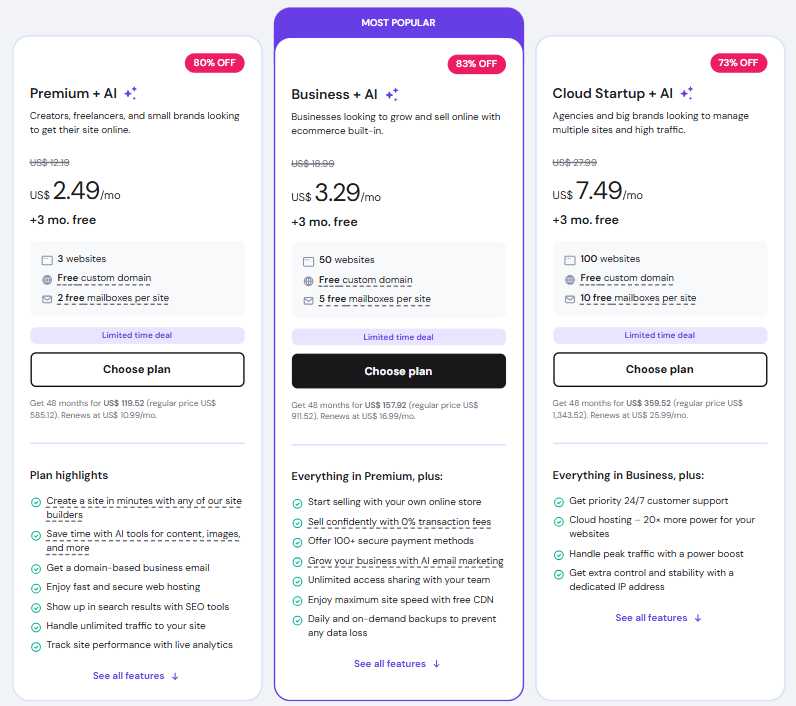
Hostinger Pricing Overview
Hostinger is widely known for being one of the most affordable web hosting providers on the market. Its introductory pricing is extremely competitive, making it a popular choice for beginners, bloggers, and small business owners.
- Shared Hosting starting price: Very low (often under $3/month on long-term plans)
- What’s included: Free SSL, weekly backups, and a custom control panel
- Renewal pricing: Increases after the first term, but remains lower than most competitors
Even after renewal, Hostinger still remains one of the cheapest options for long-term hosting, which makes it attractive for users on a tight budget.
Bluehost Pricing Overview
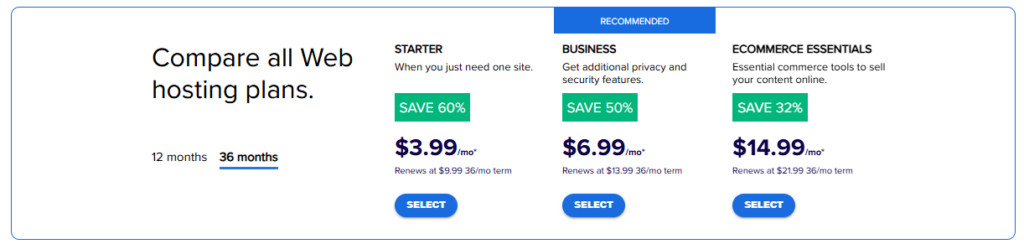
Bluehost is officially recommended by WordPress, but its pricing structure is very different from Hostinger’s.
- Shared Hosting starting price: Low for the first term
- What’s included: Free domain for the first year, free SSL, and WordPress integration
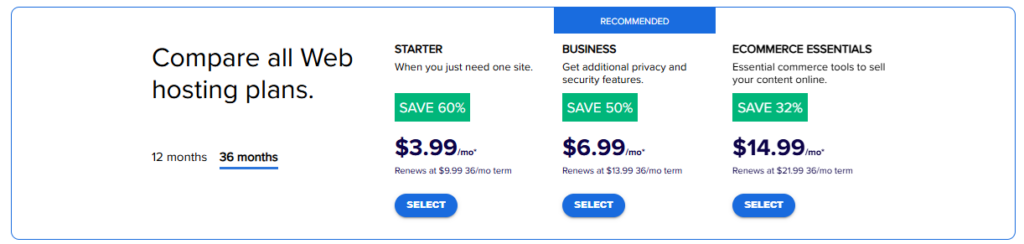
- Renewal pricing: Significantly higher than the introductory offer
After the first term, many users are surprised by how much the price jumps. Bluehost’s renewal rates are often 2–3x higher than the initial discount price, making it a more expensive long-term option.
Hostinger vs Bluehost: Which Is Cheaper Long Term?
In the long-term comparison of Hostinger vs Bluehost, Hostinger clearly wins on overall affordability. While both providers offer attractive discounts at the start, Hostinger’s renewal costs remain much more budget-friendly, especially for:
- Personal blogs
- Affiliate websites
- Small businesses
- New online entrepreneurs
Bluehost, on the other hand, becomes a premium-priced host after renewal, which may not suit users who are trying to keep monthly expenses low.
Final Verdict on Pricing
- ✅ Hostinger is best for: Budget users, beginners, long-term affordability
- ✅ Bluehost is best for: Users who want WordPress branding and don’t mind higher renewal costs
- ❌ Bluehost downside: Expensive long-term pricing
- ✅ Hostinger advantage: Low starting price + affordable renewals
Overall winner for pricing & renewal costs: Hostinger
Performance & Speed: Hostinger vs Bluehost
When it comes to web hosting performance, speed and uptime directly affect your website’s SEO rankings, user experience, and conversions. In this Hostinger vs Bluehost comparison, both providers promise fast load times—but their real-world performance tells a clearer story.
Hostinger Performance & Speed
Hostinger is built with LiteSpeed Web Servers, which are known for delivering faster page loading speeds compared to traditional Apache servers. This gives Hostinger a noticeable advantage, especially for WordPress sites.
Key performance features of Hostinger:
- LiteSpeed web server for faster loading
- Built-in caching for WordPress
- Free CDN on premium plans
- Multiple global data centers (USA, Europe, Asia, South America)
- Guaranteed 99.9% uptime
In speed tests, Hostinger consistently delivers very fast page load times, even on shared hosting. This makes it an excellent choice for:
- Blogs
- Affiliate websites
- Business websites
- International audiences
✅ Hostinger performs exceptionally well for its low price.
Bluehost Performance & Speed
Bluehost runs on Apache servers and uses a more traditional hosting setup. While Bluehost performance is stable, it generally does not match the speed levels of LiteSpeed-based hosting like Hostinger.
Key performance features of Bluehost:
- SSD storage on most plans
- Free Cloudflare CDN integration
- WordPress-optimized servers
- Guaranteed 99.9% uptime
Bluehost delivers good but not outstanding speed, especially under higher traffic loads. It works well for small to medium WordPress sites but may feel slower as your site grows.
⚠️ During traffic spikes, shared Bluehost hosting may experience slower response times compared to Hostinger.
Hostinger vs Bluehost: Uptime Reliability
Both companies advertise 99.9% uptime, which means your site should stay online almost all the time. In practice:
- ✅ Hostinger maintains very consistent uptime
- ✅ Bluehost also offers stable uptime
- ⚠️ Minor outages can still happen on shared plans for both
In terms of pure reliability, this part of the Hostinger vs Bluehost comparison is mostly a tie—but Hostinger has a slight edge in speed consistency.
Which One Is Faster for WordPress?
Since most users choose these hosts for WordPress, speed matters even more.
- ✅ Hostinger: Faster due to LiteSpeed + built-in caching
- ✅ Bluehost: Solid WordPress performance but slower under load
- ✅ Winner for WordPress speed: Hostinger
If your goal is to rank higher on Google and improve visitor experience, faster load times from Hostinger give you a competitive advantage.
Final Verdict on Performance & Speed
- ✅ Hostinger wins for raw speed and performance
- ✅ Bluehost is stable but slower
- ✅ Hostinger is better for SEO and high-speed WordPress sites
- ⚠️ Bluehost may struggle under traffic spikes
Overall performance winner: Hostinger
Ease of Use & Dashboard: Hostinger vs Bluehost
For beginners, the ease of use and control panel can make or break the hosting experience. In this Hostinger vs Bluehost comparison, both providers are beginner-friendly—but they use very different dashboard systems.
Let’s look at how easy each one is to use for launching and managing a website.
Hostinger Ease of Use (hPanel)
Hostinger does not use cPanel. Instead, it offers a custom-built control panel called hPanel, designed to be clean, modern, and easy to understand.
What makes Hostinger easy to use:
- Simple and clean interface
- One-click WordPress installation
- Easy domain and email setup
- Built-in file manager and database tools
- Beginner-friendly navigation with tooltips
Everything is organized in a step-by-step layout, which is perfect for users who have no technical experience. You can manage your website, emails, backups, and security from one simple dashboard.
✅ Hostinger is one of the most beginner-friendly hosting platforms available.
Bluehost Ease of Use (cPanel + Custom Dashboard)
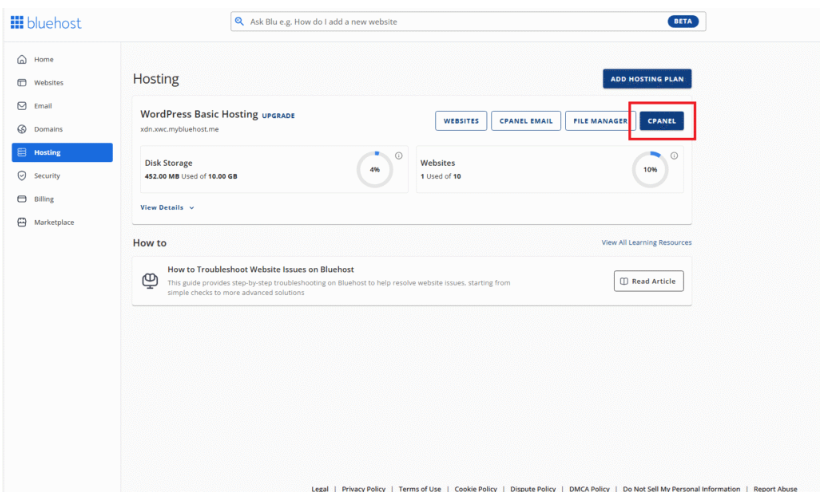
Bluehost uses a custom dashboard on top of cPanel, which is the traditional hosting control panel used by many providers.
What makes Bluehost user-friendly:
- Guided WordPress setup process
- Built-in website creation wizard
- Easy access to email, domains, and files
- Industry-standard cPanel tools
However, cPanel can feel overwhelming for beginners because it displays many technical options at once. While Bluehost tries to simplify things with its custom dashboard, some users still find it less intuitive than Hostinger’s hPanel.
⚠️ Beginners may need more time to get comfortable with Bluehost’s interface.
Website Setup Experience: Hostinger vs Bluehost
Both hosting providers offer one-click WordPress installation, but the setup experience is slightly different:
- ✅ Hostinger: Guided setup with clean steps and fewer distractions
- ✅ Bluehost: WordPress-focused setup with many add-on upsells
- ⚠️ Bluehost often pushes extra features during setup, which may confuse beginners
Hostinger’s setup feels faster and less sales-focused, while Bluehost includes more upgrade prompts during installation.
Which Is Better for Beginners?
In the Hostinger vs Bluehost ease-of-use comparison:
- ✅ Hostinger is better for: Complete beginners, bloggers, non-technical users
- ✅ Bluehost is better for: Users familiar with cPanel or traditional hosting
- ⚠️ Bluehost downside: More complex interface and frequent upsells
- ✅ Hostinger advantage: Clean, simple, modern dashboard
Final Verdict on Ease of Use & Dashboard
- ✅ Hostinger wins for simplicity and beginner experience
- ✅ Bluehost is still user-friendly, but more technical
- ✅ Hostinger’s hPanel is easier to learn than cPanel
- ⚠️ Bluehost can feel cluttered for first-time users
Overall winner for ease of use: Hostinger
Hosting Plans & Features: Hostinger vs Bluehost
When comparing Hostinger vs Bluehost, their range of hosting plans and included features play a major role in deciding which platform offers better value. Both companies provide solutions for beginners and growing websites—but they differ in flexibility, performance tools, and pricing structure.
Let’s break down what each host offers.
Hostinger Hosting Plans & Features
Hostinger provides a wide range of affordable hosting solutions designed for beginners, bloggers, and growing businesses.
Hostinger hosting types:
- Shared Hosting
- WordPress Hosting
- Cloud Hosting
- VPS Hosting
Key features included in most Hostinger plans:
- Free SSL certificate
- Free professional email
- Weekly or daily backups (depending on plan)
- LiteSpeed web server
- Built-in caching
- Free CDN (on higher plans)
- One-click WordPress installation
- Custom hPanel dashboard
- SSD storage
Hostinger is known for offering premium performance features at a low price, especially with LiteSpeed and built-in optimization tools—even on shared hosting.
✅ Hostinger delivers excellent value for the money.
Bluehost Hosting Plans & Features
Bluehost also offers a solid set of hosting products, with a strong focus on WordPress users.
Bluehost hosting types:
- Shared Hosting
- WordPress Hosting
- VPS Hosting
- Dedicated Servers
Key features included in most Bluehost plans:
- Free SSL certificate
- Free domain for the first year
- Free CDN (Cloudflare)
- One-click WordPress installation
- Automatic WordPress updates
- Custom dashboard with cPanel access
- SSD storage
However, many advanced features—such as daily backups, security tools, and performance boosts—require paid add-ons. These extras can increase the total cost quickly.
⚠️ Bluehost’s base plans are more limited unless you upgrade.
WordPress Hosting Comparison
Since WordPress is the most popular website platform, it’s important to compare how both hosts perform for WordPress users in this Hostinger vs Bluehost breakdown.
- ✅ Hostinger: LiteSpeed + built-in caching = faster WordPress performance
- ✅ Bluehost: Officially recommended by WordPress.org
- ⚠️ Bluehost relies more on paid add-ons for advanced optimization
- ✅ Hostinger includes many performance tools by default
Hostinger is often the better option for users who want speed and optimization without paying extra, while Bluehost is more focused on WordPress branding and ease of installation.
Scalability of Hosting Plans
As your website grows, your hosting needs will increase. Here’s how scalability compares in the Hostinger vs Bluehost matchup:
- ✅ Hostinger: Easy upgrades from shared → cloud → VPS
- ✅ Bluehost: Upgrade paths from shared → VPS → dedicated
- ⚠️ Bluehost upgrades are usually more expensive
- ✅ Hostinger cloud plans offer strong performance at a lower price
For small to medium websites, Hostinger’s cloud hosting offers a great balance of power and affordability.
Final Verdict on Hosting Plans & Features
- ✅ Hostinger offers better built-in features at lower prices
- ✅ Bluehost offers strong WordPress integration but fewer free features
- ⚠️ Bluehost requires paid add-ons for backups and security
- ✅ Hostinger is better for budget users and long-term scalability
Overall winner for hosting plans & features: Hostinger
WordPress Performance & Optimization: Hostinger vs Bluehost
Since WordPress powers over 40% of all websites on the internet, choosing a hosting provider that is properly optimized for WordPress is critical for speed, security, and SEO. In this Hostinger vs Bluehost comparison, both companies support WordPress—but their optimization approach is very different.
Let’s see which one delivers better real-world WordPress performance.
Hostinger WordPress Performance
Hostinger is built for speed-first WordPress hosting, even on its lowest-priced plans. Its biggest advantage is its use of the LiteSpeed web server, which is significantly faster than traditional Apache servers used by many hosts.
Hostinger WordPress optimization features include:
- LiteSpeed Web Server (faster loading)
- LiteSpeed Cache plugin pre-configured
- Built-in object and page caching
- Free CDN on higher-tier plans
- One-click WordPress installation
- Automatic WordPress updates
- Optimized PHP versions for performance
These features work together to deliver faster page load times, better Core Web Vitals scores, and improved Google rankings.
✅ Hostinger is one of the fastest WordPress hosts in its price range.
Bluehost WordPress Performance
Bluehost is officially recommended by WordPress.org, which gives it strong branding credibility. It offers a WordPress-optimized environment, but its actual performance relies more on standard server architecture.
Bluehost WordPress features include:
- One-click WordPress installation
- Automatic WordPress updates
- Free Cloudflare CDN
- WordPress staging on higher plans
- Built-in WordPress dashboard tools
While Bluehost delivers stable WordPress performance, it does not use LiteSpeed. This means its load times are generally slower than Hostinger, especially during traffic spikes.
⚠️ Many performance improvements on Bluehost require paid upgrades.
Caching & Speed Optimization: Hostinger vs Bluehost
Caching plays a major role in WordPress performance.
- ✅ Hostinger: Built-in LiteSpeed Cache at the server level
- ✅ Bluehost: Plugin-based caching and CDN
- ✅ Hostinger caching is automatic and more efficient
- ⚠️ Bluehost users must manually configure optimization plugins
This gives Hostinger an advantage for users who want fast performance without technical setup.
WordPress Staging & Developer Tools
Staging allows you to test changes before applying them to your live site.
- ✅ Hostinger: Staging available on higher plans
- ✅ Bluehost: Staging also available on premium WordPress plans
- ⚠️ Both limit staging to higher-tier packages
For beginners, Hostinger’s simpler environment still makes it easier to manage WordPress without breaking things.
Final Verdict on WordPress Performance
In the Hostinger vs Bluehost WordPress comparison:
- ✅ Hostinger delivers faster WordPress speeds
- ✅ Hostinger includes built-in caching at no extra cost
- ✅ Bluehost is reliable but slower under load
- ⚠️ Bluehost often requires paid add-ons for advanced optimization
Overall winner for WordPress performance & optimization: Hostinger
Security Features: Hostinger vs Bluehost
Website security is no longer optional. Whether you’re running a blog, business site, or online store, strong security protects your data, your visitors, and your search rankings. In this Hostinger vs Bluehost comparison, both hosting providers offer essential security tools—but the level of protection and what’s included for free is very different.
Let’s break it down.
Hostinger Security Features
Hostinger includes a strong security foundation even on its cheapest plans, making it ideal for beginners who want protection without paying for costly add-ons.
Key Hostinger security features:
- Free SSL certificate on all plans
- Cloudflare-protected nameservers
- DDoS protection
- Web Application Firewall (WAF)
- Automated weekly or daily backups (depending on plan)
- Secure access manager
- Two-factor authentication (2FA)
- Malware scanning (on higher plans)
Hostinger’s servers are also isolated using account-level protection, which reduces the risk of one hacked site affecting others on shared hosting.
✅ Hostinger delivers excellent security for its price range.
Bluehost Security Features
Bluehost provides basic security by default, but many important protections require paid upgrades.
Key Bluehost security features:
- Free SSL certificate
- Spam protection
- Free Cloudflare CDN
- Secure WordPress updates
- Basic DDoS protection
However, features like:
- Daily backups
- Malware scanning
- Advanced firewalls
- Site restoration
are mostly available through paid add-ons such as SiteLock and CodeGuard.
⚠️ Bluehost security becomes expensive if you want full protection.
Backup & Recovery Comparison
Backups are one of the most important security features in any Hostinger vs Bluehost decision.
- ✅ Hostinger: Automatic backups included (weekly or daily by plan)
- ❌ Bluehost: Daily backups require a paid add-on
- ✅ Hostinger allows easy one-click restores
- ⚠️ Bluehost users must pay for advanced recovery features
This is a major advantage for Hostinger, especially for non-technical users.
Malware Protection & Firewalls
- ✅ Hostinger: Built-in firewall and malware scanning (on premium plans)
- ⚠️ Bluehost: Malware scanning is mostly a paid service
- ✅ Hostinger offers better default protection
- ⚠️ Bluehost relies heavily on third-party paid security tools
Final Verdict on Security Features
In the Hostinger vs Bluehost security comparison:
- ✅ Hostinger includes more security features for free
- ✅ Hostinger provides automatic backups at no extra cost
- ⚠️ Bluehost requires paid add-ons for full protection
- ✅ Hostinger offers better overall security value
Overall winner for security: Hostinger
Pros, Cons & Best Use Cases: Hostinger vs Bluehost
To wrap up this Hostinger vs Bluehost comparison, let’s look at the key strengths, weaknesses, and ideal use cases for each hosting provider. This section helps readers quickly decide which host is best for their specific needs.
✅ Hostinger Pros
- Very affordable starting and renewal prices
- LiteSpeed servers for faster performance
- Built-in WordPress caching and optimization
- Free SSL, backups, and security features
- Clean, beginner-friendly hPanel dashboard
- Excellent performance for the price
- Good global data center coverage
❌ Hostinger Cons
- No phone support (live chat only)
- No free domain on the lowest plans
- Staging is limited to higher-tier plans
✅ Bluehost Pros
- Officially recommended by WordPress.org
- Free domain for the first year
- Good WordPress integration and onboarding
- Phone and live chat support available
- Reliable uptime and infrastructure
❌ Bluehost Cons
- High renewal prices
- Many essential features require paid add-ons
- Slower performance compared to Hostinger
- Dashboard can feel cluttered for beginners
- Aggressive upsells during setup
Best Use Cases: Hostinger vs Bluehost
✅ Choose Hostinger If You:
- Are on a tight budget
- Want the lowest long-term hosting costs
- Care about website speed and SEO
- Are a beginner, blogger, or affiliate marketer
- Want free security and backups included
- Don’t want to deal with constant upsells
👉 Best for:
Bloggers, niche sites, affiliate marketers, freelancers, startups, and small business websites.
✅ Choose Bluehost If You:
- Want official WordPress.org branding
- Prefer phone support
- Like traditional cPanel hosting
- Don’t mind paying more after renewal
- Are building a simple WordPress site with no advanced speed requirements
👉 Best for:
WordPress beginners who want guided setup and brand recognition.
Final Verdict: Hostinger vs Bluehost
When you compare everything—pricing, speed, features, security, ease of use, and WordPress performance—Hostinger clearly offers the better overall value for most users.
- ✅ Best for beginners & budget users: Hostinger
- ✅ Best for WordPress branding & phone support: Bluehost
- ✅ Best long-term investment: Hostinger
Overall winner of the Hostinger vs Bluehost comparison: Hostinger 🏆
Final Conclusion: Hostinger vs Bluehost — Which Should You Choose?
After comparing Hostinger vs Bluehost across all the most important factors—pricing, performance, ease of use, hosting features, WordPress optimization, security, and customer support—one result is clear: Hostinger delivers better overall value for most users in 2025.
If your main priorities are:
- ✅ Low long-term cost
- ✅ Fast website speed for better SEO
- ✅ Free security and backups
- ✅ Beginner-friendly dashboard
- ✅ Strong WordPress performance without extra fees
then Hostinger is the smarter choice.
On the other hand, Bluehost is still a solid hosting provider, especially for:
- Users who prefer phone support
- Those who want WordPress.org’s official recommendation
- Beginners who like guided WordPress setup
However, Bluehost’s high renewal prices, frequent upsells, and slower performance make it harder to recommend as a long-term solution when compared directly to Hostinger.
✅ Final Winner: Hostinger
For bloggers, affiliate marketers, small business owners, freelancers, and anyone building a website on a budget, Hostinger offers the best balance of price, performance, and features in this Hostinger vs Bluehost showdown.
If you want:
- Faster load times
- Better Google rankings
- Lower monthly costs
- Built-in security and backups
👉 Hostinger is the clear winner.
🔍 Hostinger vs Bluehost: Quick Comparison Summary
| Feature | Hostinger | Bluehost |
|---|---|---|
| Starting Price | Very Low | Low (Intro Only) |
| Renewal Cost | ✅ Affordable | ❌ Very High |
| Website Speed | ✅ LiteSpeed (Faster) | ⚠️ Apache (Slower) |
| WordPress Performance | ✅ Built-in Caching | ⚠️ Plugin-Based |
| Ease of Use | ✅ hPanel (Beginner-Friendly) | ⚠️ cPanel + Custom UI |
| Free Domain | ❌ On Higher Plans | ✅ 1st Year Free |
| Free Backups | ✅ Included | ❌ Paid Add-on |
| Security Features | ✅ Strong by Default | ⚠️ Mostly Paid |
| Customer Support | ✅ 24/7 Live Chat | ✅ Phone + Chat |
| Best For | Budget Users, Bloggers, Affiliates | WordPress Branding Fans |
| Overall Winner | 🏆 Hostinger |
🚀 Call-to-Action: Get the Best Deal on Hostinger or Bluehost
Now that you’ve seen the full Hostinger vs Bluehost comparison, the final step is choosing the right hosting provider for your website goals.
✅ Choose Hostinger If You Want:
- The lowest long-term hosting costs
- Faster website speed for better Google rankings
- Free security, backups, and performance tools
- A simple dashboard perfect for beginners
- The best value for money in 2025
👉 [Get the Latest Hostinger Discount Here]
(Limited-time deals available — prices may increase anytime)
✅ Choose Bluehost If You Want:
- Official WordPress.org recommendation
- Phone support
- A free domain for the first year
- A traditional cPanel experience
👉 [Check Current Bluehost Deals Here]
💡 Final Buying Advice
If your goal is to build a fast, affordable, and profitable website, then Hostinger is the smarter long-term investment in this Hostinger vs Bluehost comparison.
- ✅ Lower costs
- ✅ Better performance
- ✅ More free features
- ✅ Higher profit margins for affiliates
That’s why Hostinger is our #1 recommended hosting provider for 2026. 🏆
Frequently Asked Questions (FAQ): Hostinger vs Bluehost
1. Is Hostinger better than Bluehost?
Yes, for most users, Hostinger is better than Bluehost in terms of pricing, speed, and free features. Hostinger offers faster LiteSpeed servers, lower renewal costs, and free backups and security tools. Bluehost is still a good option for WordPress beginners who prefer phone support, but it is more expensive long-term.
2. Which is cheaper: Hostinger or Bluehost?
Hostinger is cheaper than Bluehost both at signup and at renewal. While both offer low introductory prices, Bluehost’s renewal rates increase significantly after the first term. Hostinger remains affordable even after renewal, making it the better long-term option.
3. Is Hostinger good for WordPress?
Yes, Hostinger is excellent for WordPress hosting. It uses LiteSpeed servers, built-in caching, optimized PHP versions, and automatic updates, which result in faster load times and better SEO performance than most shared hosts, including Bluehost.
4. Why is Bluehost recommended by WordPress?
Bluehost is recommended by WordPress.org mainly due to a long-standing partnership. While Bluehost is reliable and beginner-friendly, this recommendation does not mean it is the fastest or cheapest WordPress host. Many users now prefer Hostinger for better performance and pricing.
5. Does Hostinger offer free backups?
Yes, Hostinger includes free automatic backups on most plans (weekly on basic plans and daily on higher plans). Bluehost, on the other hand, requires a paid add-on for daily backups.
6. Which is better for beginners: Hostinger or Bluehost?
Hostinger is better for beginners because it offers a clean, modern dashboard (hPanel), simple setup, built-in performance tools, and no confusing upsells. Bluehost is also beginner-friendly but uses cPanel, which can feel overwhelming.
7. Is Bluehost worth the higher renewal price?
For most users, Bluehost is not worth the high renewal price when compared to Hostinger. Once the discount ends, Bluehost becomes much more expensive while still offering fewer free features than Hostinger.
8. Which hosting is better for SEO: Hostinger or Bluehost?
Hostinger is better for SEO because it provides faster load speeds, LiteSpeed caching, better Core Web Vitals performance, and free security features. These factors directly help improve Google rankings.
9. Can I switch from Bluehost to Hostinger?
Yes, you can easily migrate from Bluehost to Hostinger. Hostinger offers free website migration, and the process is usually completed with little to no downtime.
10. Who should choose Bluehost over Hostinger?
You should choose Bluehost over Hostinger only if:
- You need phone support
- You strongly prefer cPanel
- You want the WordPress.org branding
- You don’t mind paying higher renewal fees


